
Cos(A-B) and Its Applications
Loading the math board and drawing, please wait…
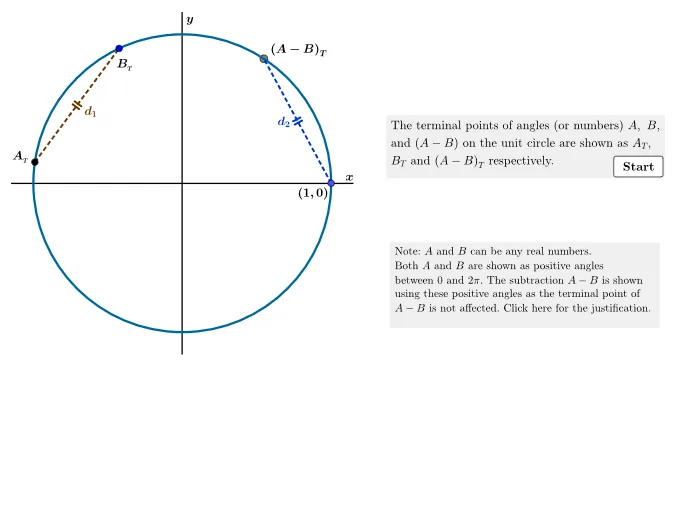
This example illustrates the geometric meaning of the cosine(A-B) formula. By constructing points A and B on the unit circle and their angle relationship, the value of cos(A-B) is intuitively demonstrated. Key mathematical concepts include trigonometric functions, the unit circle, and angles. GeoGebra commands used include Circle, Point, Rotate, Polygon, Segment, Angle, Midpoint, CircleArc, and Intersect. Suitable for high school mathematics teaching and learning, particularly in trigonometry and geometric construction.
GeoGebra Commands & Parameters
Circle(O, 1) → UCPoint(UC) → APoint(UC) → BRotate((1, 0), Angle[B, O, A]) → AminBPolygon(LL, LR, UR, UL) → theBox, ll, lr, ur, ulSegment(O, A) → AsegSegment(O, B) → BsegSegment(O, AminB) → ABsegAngle(P0, O, A) → angAMidpoint(ABseg) → AminBmidMidpoint(Aseg) → AsegmidCircleArc(O, AminBmid, Asegmid) → BminarcIntersect(Bminarc, AngularBisector[Aseg, ABseg]) → Bminmid,Midpoint(Bseg) → BsegmidAngle(AminB, O, A) → BnegAngle(B, O, A) → AminB1Angle((1, 0), O, AminB) → AminBsSegment(A, B) → cordABSegment((1, 0), AminB) → cordAminBAngle((1, 0), O, B) → angBTextfield(stuAx) → inputAxTextfield(stuAy) → inputAyIf(step > 2, "B_T&=(\cos B, \sin B)", "") → BttextIf(step > 1, "A_T&=(\cos A, \sin A)", "") → AttextIf(step > 3, "(A-B)_T&=\Big(\cos(A-B), \sin(A-B)\Big)", "") → ABttextTextfield(stuBx) → inputBxTextfield(stuBy) → inputByTextfield(stuABy) → inputAByTextfield(stuABx) → inputABxTextfield(stud1) → inputd1Textfield(stud2) → inputd2If(step > 4, "d_1&=\sqrt{(\cos B-\cos A)^2+(\sin B-\sin A)^2}", "") → d1textIf(step > 4, "d_2&=\sqrt{\big(\cos (A- B)-1\big)^2+ \sin^2( A-B)}", "") → d2textIf(showjust, stepneg1supp, "") → stepneg12
AI Drawing Prompt Reference
Draw a unit circle centered at the origin. Place two movable points A and B on the circle, and draw radii from the center to each. Rotate the point at angle zero by the angle from B to A to create a new point, and draw a radius to it. Construct an arc between the midpoints of this new radius and the radius to A. Connect A and B with a chord, and also connect the point at angle zero to the new point with another chord. Show angle labels and gradually display the coordinates of A, B, and the new point, along with distance formulas for the two chords, to illustrate the cosine difference identity.
The prompt above was compiled from the original drawing commands and is for reference only.