
Rectangular Pyramid by Mathguru
Loading the math board and drawing, please wait…
In collections
SA and Volume
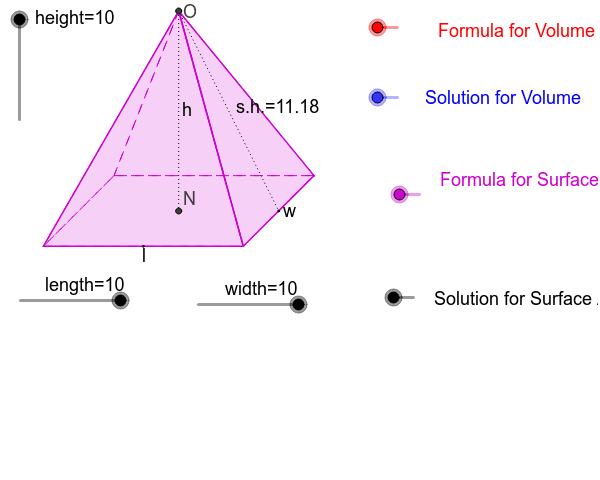
This example demonstrates a rectangular pyramid, a three‑dimensional solid with a rectangular base, constructed using GeoGebra. It involves core concepts from solid geometry, coordinate geometry, transformations (dilation, translation), and differential calculus. The construction uses commands such as Dilate, Vector, Circle, Line, Intersect, Translate, Midpoint, Polygon, Segment, and If, with objects representing height, length, width, and other parameters. It is suitable for high‑school or early university students learning geometric modeling and spatial visualization.
GeoGebra Commands & Parameters
Dilate(F, height, E) → GVector(E, G) → uDilate(I, length, H) → LVector(H, L) → vCircle(J, width) → gLine(J, K) → hIntersect(g, h, 1) → MVector(J, M) → wTranslate(A, v) → BTranslate(A, Vector[w / 2]) → CTranslate(C, v) → DMidpoint(C, B) → NTranslate(N, u) → OPolygon(A, B, D, C) → P, a, b, d, cPolygon(O, C, D) → Q, d_1, o, c_1Polygon(O, A, C) → R, c_2, o_1, a_1Polygon(O, D, B) → S, b_1, o_2, d_2Polygon(O, A, B) → T, b_2, o_3, a_2Midpoint(B, D) → USegment(O, N) → eSegment(O, U) → fMidpoint(O, U) → WMidpoint(O, N) → VMidpoint(A, B) → YIf(height ≤ 5, C) → ZSegment(Z, O) → iSegment(Z, A) → jIf(VolumeFormula ≟ 1, A_1) → E_1If(SurfaceAreaFormula ≟ 1, C_1) → G_1If(VolumeSolution ≟ 1, B_1) → F_1If(SurfaceAreaSolution ≟ 1, D_1) → H_1
AI Drawing Prompt Reference
Create a rectangular pyramid by first drawing a rectangle to serve as the base, indicating its length and width. From each corner of the base, draw line segments up to a common apex point positioned above the base at a height. Mark the apex, the base center, and the midpoints of the base edges. Include lines from the apex to the base center and to the midpoints of the base edges. Optionally, add a cross‑section plane that cuts through the pyramid to reveal internal geometry, such as a triangular face or a slice showing the height and base dimensions.
The prompt above was compiled from the original drawing commands and is for reference only.