
Rectangular Parallelepiped
Loading the math board and drawing, please wait…
In collections
The GeoGebra's Toolbox for Teachers and Students
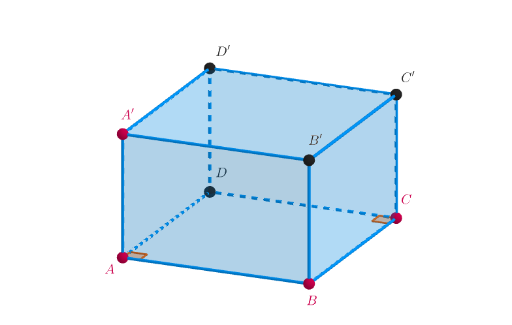
This example demonstrates the construction and properties of a rectangular parallelepiped. Key mathematical concepts include solid geometry, geometric construction, and spatial coordinates. The construction involves GeoGebra commands such as PointIn, Polygon, Prism, and sliders to adjust parameters. Suitable for middle school students to learn solid geometry and spatial visualization.
GeoGebra Commands & Parameters
PointIn(z = 0) → APointIn(z = 0) → BSegment(A, B) → fOrthogonalLine(B, f, xOyPlane) → gPoint(g) → COrthogonalLine(C, g, xOyPlane) → hOrthogonalLine(A, f, xOyPlane) → iIntersect(h, i) → DPolygon(A, B, C, D) → q1, a, b, c, dOrthogonalLine(A, xOyPlane) → jPoint(j) → A'Prism(q1, A') → e, B', spigoloBF, spigoloCG, spigoloDH, spigoloEF, spigoloFG, spigoloGH, spigoloEH, C', D', facciaABFE, facciaBCGF, facciaCDHG, facciaADHE, facciaEFGH, spigoloAESegment(A', C) → kSegment(A, C) → lAngle(D, A, B, xOyPlane) → αAngle(B, C, D, xOyPlane) → β
AI Drawing Prompt Reference
Draw a rectangular parallelepiped with six rectangular faces and eight edges. The six faces are all rectangles with equal side lengths of 1. The eight edges are AB, BC, CD, DA, EF, FG, GH, and HE. The vertices D, E, F, G, H, A, B, and C form a rectangular parallelepiped.
The prompt above was compiled from the original drawing commands and is for reference only.