
Rectangle Construction Template
Loading the math board and drawing, please wait…
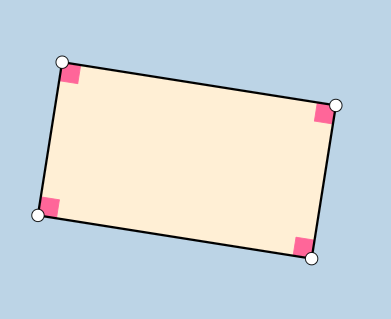
This example demonstrates how to construct a rectangle using points, line segments, and angles. Core math concepts include line segments, angles, orthogonal lines, reflections, and polygon construction. GeoGebra commands like Line, OrthogonalLine, Point, Intersect, Polygon, Segment, and Angle are used for the construction. Suitable for middle school students and teachers for learning and teaching geometric constructions.
GeoGebra Commands & Parameters
Line(A, B) → fOrthogonalLine(A, f) → gPoint(g) → DLine(D, f) → hLine(B, g) → iIntersect(h, i) → EPolygon(A, B, E, D) → poly1, a, b, e, dSegment(D, E) → jSegment(E, B) → kSegment(B, A) → lSegment(A, D) → mAngle(poly1) → α, β, γ, δ
AI Drawing Prompt Reference
Draw a rectangle by first setting two points A and B, then drawing perpendicular lines through A and B, taking points D and E on these perpendicular lines respectively, and connecting A to D, B to E, E to B, and D to A to form the rectangle. Finally, mark the four interior angles of the rectangle.
The prompt above was compiled from the original drawing commands and is for reference only.