
Rectangle by Katie Drach
Loading the math board and drawing, please wait…
In collections
Types of Parallelograms
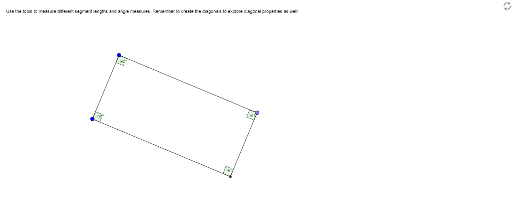
This example demonstrates the construction of a rectangle. It involves key mathematical concepts such as geometric construction and coordinate geometry. Using GeoGebra commands like Segment, OrthogonalLine, Point, Line, Intersect, etc., the vertices and sides of the rectangle can be constructed. Suitable for students at the junior high school level and above to learn geometric construction and coordinate geometry.
GeoGebra Commands & Parameters
Segment(A, B) → aOrthogonalLine(A, a) → bOrthogonalLine(B, a) → cPoint(b) → CLine(C, a) → dIntersect(c, d) → DSegment(A, C) → eSegment(C, D) → fSegment(B, D) → gAngle(B, A, C) → αAngle(D, B, A) → βAngle(C, D, B) → γAngle(A, C, D) → δ
AI Drawing Prompt Reference
Draw a rectangle by first creating a line segment between points A and B, then drawing two perpendicular lines from A and B respectively, which intersect at points C and D. Next, draw line segments from A to C, C to D, and B to D. Finally, ensure all four angles are right angles.
The prompt above was compiled from the original drawing commands and is for reference only.