
Reconstructing the Girih Pattern (2): Underlying Polygonal Tiling
Loading the math board and drawing, please wait…
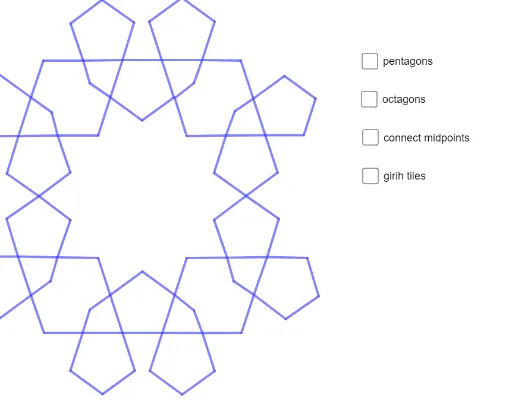
① This example demonstrates how to reconstruct an Islamic girih pattern in GeoGebra, focusing on the underlying tiling composed of various polygons such as rectangles, parallelograms, and triangles. ② Core mathematical concepts include polygonal tiling, symmetry, congruence, and the use of 3D vectors for planar positioning, highlighting geometric construction and spatial relationships. ③ Construction details: Based on the summary, commands like Polygon, PolyLine, and Segment are used, creating multiple polygon objects (veelhoek1, veelhoek2, veelhoek3) and numerous points (A through S) and segments (f through s). The pattern is built by precisely placing vertices and connecting segments to form repeating units, with vectors or 3D elements aiding alignment. ④ Suitable for high school or university geometry courses, this example is ideal for exploring cultural mathematics, tiling art, and geometric construction, and can serve as material for interdisciplinary projects linking math and art.
GeoGebra Commands & Parameters
Polygon(C, D, 5) → veelhoek1, f, g, h, i, j, E, F, GPolygon(H, I, 5) → veelhoek2, k, l, m, n, p, J, K, LPolygon(I, N, O, P, Q, R, S, M) → veelhoek3, i_1, n_1, o, p_1, q, r, s, m_1Polygon(Q, T, 5) → veelhoek4, t, a, b, c, d, U, V, WPolygon(U, Z, 5) → veelhoek5, e, f_1, g_1, h_1, j_1, A_1, B_1, C_1Polygon(D_1, E_1, 5) → veelhoek6, k_1, l_1, q_1, r_1, s_1, F_1, G_1, H_1Polygon(G_1, I_1, 5) → veelhoek7, t_1, a_1, b_1, c_1, d_1, J_1, K_1, L_1Polygon(M_1, N_1, 5) → veelhoek8, e_1, f_2, g_2, h_2, i_2, O_1, P_1, Q_1Polygon(M_1, R_1, 5) → veelhoek9, j_2, k_2, l_2, m_2, n_2, S_1, T_1, U_1Polygon(H, D, 5) → veelhoek10, p_2, q_2, r_2, s_2, t_2, V_1, W_1, Z_1Polygon(R_1, A_2, 5) → veelhoek11, a_2, b_2, c_2, d_2, e_2, B_2, C_2, D_2Polygon(C, E_2, F_2, G_2, D_1, H_2, V_1, I_2) → veelhoek12, c_3, f_3, g_3, h_3, i_3, j_3, v_1, k_3Polygon(S, W, 5) → veelhoek13, l_3, m_3, n_3, p_3, q_3, J_2, K_2, L_2Polygon(B_1, M_2, 5) → veelhoek14, r_3, s_3, t_3, a_3, b_3, N_2, O_2, P_2Polygon(Q_2, J_1, 5) → veelhoek15, d_3, e_3, f_4, g_4, h_4, R_2, S_2, T_2Polygon(E_1, F_2, 5) → veelhoek16, i_4, j_4, k_4, l_4, m_4, U_2, V_2, W_2Polygon(K_1, Z_2, Q_2, A_3, N_1, B_3, U_1, C_3) → veelhoek17, n_4, z_2, p_4, q_4, r_4, s_4, u_1, t_4Polygon(A_1, D_3, S_1, E_3, D_2, F_3, M_2, G_3) → veelhoek18, a_4, b_4, c_4, d_4, e_4, f_5, g_5, h_5PolyLine(H_3, L_3, D_4, N_3, M_3, C_4) → i_5PolyLine(I_3, C_4, K_3, A_4, B_4, J_3) → j_5PolyLine(W_3, V_3, R_3, T_3, U_3, Z_3) → k_5PolyLine(O_3, E_4, Q_3, S_3, R_3, P_3) → l_5Segment(H_3, C_4) → m_5Segment(C_4, I_3) → n_5Segment(I_3, J_3) → p_5Segment(N_3, O_3) → q_5Segment(O_3, P_3) → r_5Segment(S_3, F_4) → s_5Segment(T_3, G_4) → t_5Segment(W_3, Z_3) → a_5Segment(W_3, A_4) → b_5Segment(H_3, H_4) → c_5Segment(I_3, I_4) → d_5
AI Drawing Prompt Reference
Draw an Islamic geometric pattern composed of multiple regular polygons (including rectangles, parallelograms, and triangles). Start by drawing several pentagons, then connect the vertices to form repeating units. Use vectors to align the polygons, ensuring symmetry and consistency. Finally, construct the overall structure using polygons and segments.
The prompt above was compiled from the original drawing commands and is for reference only.