
Radian Exploration (30 Degree Increments)
Loading the math board and drawing, please wait…
In collections
What is a Radian Anyway?
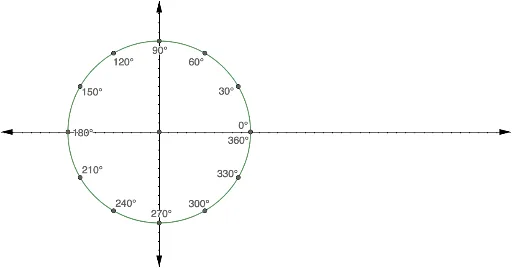
This example demonstrates the concept of radians by exploring angles in 30-degree increments. Key mathematical concepts include angles, radians, and rotation transformations. Using GeoGebra's rotation commands, the rotation effects of angles are visually illustrated. Suitable for high school mathematics education, particularly in coordinate geometry and trigonometry.
GeoGebra Commands & Parameters
Intersect(xAxis, yAxis) → AIntersect(c, xAxis, 2) → BIntersect(c, yAxis, 2) → CIntersect(c, yAxis, 1) → ERotate(B, 10°, A) → B'Rotate(B', 10°, A) → B''Rotate(B'', 10°, A) → B'''Rotate(B''', 10°, A) → FRotate(F, 10°, A) → F'Rotate(F', 10°, A) → F''Rotate(F'', 10°, A) → F'''Rotate(F''', 10°, A) → GRotate(C, 10°, A) → C'Rotate(C', 10°, A) → C''Rotate(C'', 10°, A) → C'''Rotate(C''', 10°, A) → HRotate(H, 10°, A) → H'Rotate(H', 10°, A) → H''Intersect(c, xAxis, 2) → DRotate(D, 10°, A) → D'Rotate(D', 10°, A) → D''Rotate(D'', 10°, A) → D'''Rotate(D''', 10°, A) → JRotate(J, 10°, A) → J'Rotate(J', 10°, A) → J''Rotate(J'', 10°, A) → J'''Rotate(J''', 10°, A) → KRotate(K, 100°, A) → K'Rotate(H'', 10°, A) → H'''Rotate(H''', 10°, A) → IRotate(K, 20°, A) → K'_1Rotate(K'_1, 10°, A) → LRotate(L, 10°, A) → L'Rotate(L', 10°, A) → L''Rotate(L'', 10°, A) → L'''Rotate(L''', 10°, A) → MRotate(M, 10°, A) → M'Rotate(M', 10°, A) → M''
AI Drawing Prompt Reference
Draw a coordinate system with the origin O, where the intersection of the x-axis and y-axis are points A and B, respectively. Rotate point B 30 degrees clockwise around point A to get B', then continue rotating to get B'', B''', and so on until a total rotation of 180 degrees. Similarly, rotate point C 30 degrees clockwise around point A to get C', then continue rotating to get C'', C''', and so on until a total rotation of 180 degrees. Finally, rotate point D 100 degrees clockwise around point A to get D', then continue rotating to get D'', D''', and so on until a total rotation of 180 degrees.
The prompt above was compiled from the original drawing commands and is for reference only.