
Radian Exploration
Loading the math board and drawing, please wait…
In collections
What is a Radian Anyway?
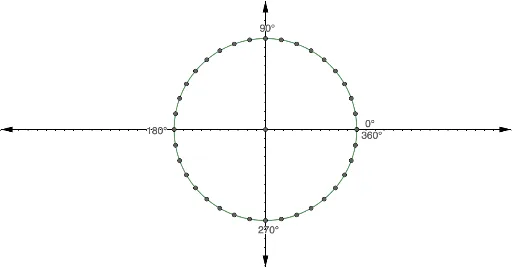
This example demonstrates the concept of radians and their applications in geometry. Key mathematical concepts include radians, perimeter, and solid geometry. Using GeoGebra commands such as Intersect and Rotate, various geometric shapes such as circles, rectangles, and 3D shapes are constructed. Suitable for high school mathematics education and learning.
GeoGebra Commands & Parameters
Intersect(xAxis, yAxis) → AIntersect(c, xAxis, 2) → BIntersect(c, yAxis, 2) → CIntersect(c, yAxis, 1) → ERotate(B, 10°, A) → B'Rotate(B', 10°, A) → B''Rotate(B'', 10°, A) → B'''Rotate(B''', 10°, A) → FRotate(F, 10°, A) → F'Rotate(F', 10°, A) → F''Rotate(F'', 10°, A) → F'''Rotate(F''', 10°, A) → GRotate(C, 10°, A) → C'Rotate(C', 10°, A) → C''Rotate(C'', 10°, A) → C'''Rotate(C''', 10°, A) → HRotate(H, 10°, A) → H'Rotate(H', 10°, A) → H''Intersect(c, xAxis, 2) → DRotate(D, 10°, A) → D'Rotate(D', 10°, A) → D''Rotate(D'', 10°, A) → D'''Rotate(D''', 10°, A) → JRotate(J, 10°, A) → J'Rotate(J', 10°, A) → J''Rotate(J'', 10°, A) → J'''Rotate(J''', 10°, A) → KRotate(K, 100°, A) → K'Rotate(H'', 10°, A) → H'''Rotate(H''', 10°, A) → IRotate(K, 20°, A) → K'_1Rotate(K'_1, 10°, A) → LRotate(L, 10°, A) → L'Rotate(L', 10°, A) → L''Rotate(L'', 10°, A) → L'''Rotate(L''', 10°, A) → MRotate(M, 10°, A) → M'Rotate(M', 10°, A) → M''
AI Drawing Prompt Reference
Draw a circle, then rotate points on the circle clockwise around the center by 10 degrees multiple times to form a series of points. Next, rotate the endpoints of the circle's diameter clockwise around the center by 10 degrees multiple times to form another series of points. Finally, connect these points to form a series of arcs and line segments, demonstrating the circle's symmetry and angle relationships.
The prompt above was compiled from the original drawing commands and is for reference only.