
Quotient of Powers
Loading the math board and drawing, please wait…
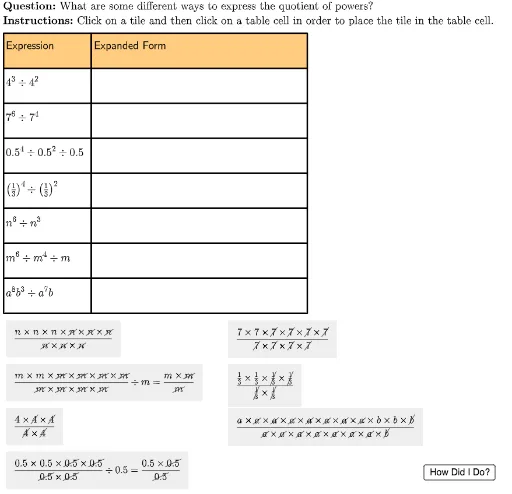
This example demonstrates the quotient rule for exponents. Using GeoGebra, students can visually understand how to simplify and calculate the quotient of different powers. The construction summary shows how to convert between exponential form and expanded form using commands like Sequence, Element, UnicodeToLetter, and LaTeX. Suitable for middle school and above students learning exponent operations.
GeoGebra Commands & Parameters
Sequence(Polygon[tableAnchor + (col1Width, 0 - (rowHeight * i)), tableAnchor + (col1Width + col2Width, 0 - (rowHeight * i)), tableAnchor + (col1Width + col2Width, 0 - (rowHeight * i) - rowHeight), tableAnchor + (col1Width, ((-rowHeight) * i) - rowHeight)], i, 0, lastRow - 1) → tableCol2Element(tableCol2, 2) → E2UnicodeToLetter(10003) → cmarkUnicodeToLetter(10007) → xmarkSequence(Polygon[tableAnchor + (0, 0 - (rowHeight * i)), tableAnchor + (col1Width, 0 - (rowHeight * i)), tableAnchor + (col1Width, 0 - (rowHeight * i) - rowHeight), tableAnchor + (0, ((-rowHeight) * i) - rowHeight)], i, 0, lastRow - 1) → tableCol1Element(tableCol1, 1) → B1Element(tableCol1, 2) → B2Element(tableCol1, 3) → B3Element(tableCol1, 4) → B4Element(tableCol1, 5) → B5Element(tableCol1, 6) → B6Element(tableCol2, 1) → E1Element(tableCol2, 3) → E3Element(tableCol2, 4) → E4Element(tableCol2, 5) → E5Element(tableCol2, 6) → E6Sequence(Polygon[tableAnchor + (col1Width + col2Width, 0 - (rowHeight * i)), tableAnchor + (col1Width + col2Width + col3Width, 0 - (rowHeight * i)), tableAnchor + (col1Width + col2Width + col3Width, 0 - (rowHeight * i) - rowHeight), tableAnchor + (col1Width + col2Width, ((-rowHeight) * i) - rowHeight)], i, 0, lastRow - 1) → tableCol3Element(tableCol3, 1) → M1Element(tableCol3, 2) → M2Element(tableCol3, 3) → M3Element(tableCol3, 4) → M4Element(tableCol3, 5) → M5Element(tableCol3, 6) → M6LaTeX("\text{Expression}") → A1Element(tableCol1, 7) → B7Element(tableCol1, 8) → B8LaTeX("\text{Expanded Form}") → C1Element(tableCol2, 7) → E7Element(tableCol2, 8) → E8LaTeX("\text{Exponential Form}") → K1Element(tableCol3, 7) → M7Element(tableCol3, 8) → M8LaTeX("4^3 \div 4^2") → A2LaTeX("7^6 \div 7^4") → A3LaTeX("0.5^4 \div 0.5^2 \div 0.5") → A4LaTeX("\left(\tfrac{1}{3}\right)^4 \div \left(\tfrac{1}{3}\right)^2") → A5LaTeX("n^6 \div n^3") → A6LaTeX("m^6 \div m^4 \div m") → A7LaTeX("a^8b^3 \div a^7b") → A8LaTeX("\text{\textbf{Question: }What are some different ways to express the quotient of powers?\\\textbf{Instructions: }Click on a tile and then click on a table cell in order to place the tile in the table cell.}") → TEXTLaTeX("\text{You expanded and simplified the quotient of powers.}") → feedbackFinal
AI Drawing Prompt Reference
Draw a table with three columns and eight rows to demonstrate the quotient of powers. The first column is labeled 'Expression', the second 'Expanded Form', and the third 'Exponential Form'. Place several division expressions in the table, such as 4^3 divided by 4^2, 7^6 divided by 7^4, 0.5^4 divided by 0.5^2 then divided by 0.5, (1/3)^4 divided by (1/3)^2, n^6 divided by n^3, m^6 divided by m^4 then divided by m, and a^8 b^3 divided by a^7 b. Each expression has corresponding expanded and exponential results. Above the table, include instructions asking to click on a tile and then click on a table cell to place it, and show a final feedback message.
The prompt above was compiled from the original drawing commands and is for reference only.