
Quiz on Solving Trig Equations
Loading the math board and drawing, please wait…
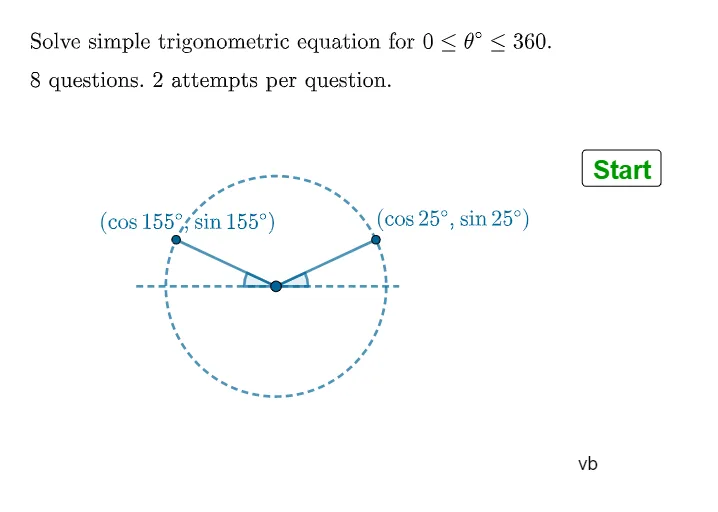
This example demonstrates how to solve simple trigonometric equations within one revolution using GeoGebra. It involves core math concepts like trigonometric functions, equation solving, unit circle, and angle transformations. Construction highlights include commands and objects such as RandomElement, If, Textfield, Random, Corner, Line, Point, Circle, Rotate, Angle, Ray, Intersect, Segment. Suitable for high school mathematics teaching, reinforcing the solution methods of trigonometric equations through practice and interactive exploration.
GeoGebra Commands & Parameters
RandomElement(listans1) → qdec1RandomElement(qQlist) → qQRandomElement(listans2) → qdec2RandomElement(listans3) → qdec3RandomElement(listans4) → qdec4If(qQ ≟ 1, qdec1, If[qQ ≟ 2, qdec2, If[qQ ≟ 3, qdec3, qdec4]]) → qdecIf((rR ≟ 1 ∨ rR ≟ 3) ∧ qdec ≟ 0, 1, 0) → showbox3Textfield(stans2) → InputBox2If(rR ≟ 1 ∧ qdec ≟ 1 ∨ rR ≟ 1 ∧ qdec ≟ -1 ∨ rR ≟ 2 ∧ qdec ≟ -1, 0, 1) → showbox2If(rR ≟ 1, round(180° - arcs, 1), If[rR ≟ 2, round(360° - arcc, 1), round(180° + arct, 1)]) → aNS2poszeroIf(rR ≟ 1, round(360° + arcs, 1), If[rR ≟ 2, round(360° - arcc, 1), round(360° + arct, 1)]) → aNS2negRandom(1, 3) → rRran3If(qQ ≟ 1, qdec1, If[qQ ≟ 2, qdec2, If[qQ ≟ 3, qdec3r, qdec4r]]) → qdecrIf(qdecr ≟ 0.87, pr3o2, If[qdecr ≟ -0.87, nr3o2, If[qdecr ≟ 0.71, pr2o2, If[qdecr ≟ -0.71, nr2o2, If[qdecr ≟ 0.58, pr3o3, If[qdecr ≟ -0.58, nr3o3, If[qdecr ≟ 1.73, pr3, If[qdecr ≟ -1.73, nr3, Text[qdecr]]]]]]]]) → thetatextIf(rR ≟ 1, text1, If[rR ≟ 2, text2, text3]) → qtextIf(rR ≟ 1, round(180° - arcs, 1), If[rR ≟ 2, arccr, round(180° + arct, 1)]) → aNS1negIf(rR ≟ 1, arcsr, If[rR ≟ 2, arccr, arctr]) → aNS1poszeroTextfield(stans1) → InputBox1Textfield(stans3) → InputBox3Random(1, 2) → rRran2If(qdec ≥ 0, Text[aNS1poszero], Text[aNS1neg]) → theta1textIf(showbox2 ≟ 1 ∧ qdec ≥ 0, (", " * Text[aNS2poszero]), If[showbox2 ≟ 1 ∧ qdec < 0, (", " * Text[aNS2neg]), ""]) → theta2textIf(showbox3 ≟ 1, (", " * Text[aNS3]), "") → theta3textCorner(5) → dimsLine(A, B) → fPoint(f) → CCircle(C, D) → cRotate(B, 25°, C) → B'Angle(B, C, B') → αRotate(A, -25°, C) → A'Angle(A', C, A) → βRay(C, B') → gRay(C, A') → hIntersect(c, h) → E,Intersect(c, g) → F,Segment(C, F) → iSegment(C, E) → jSegment(A, B) → k
AI Drawing Prompt Reference
Draw a unit circle with center C and radius 1. Draw a ray g from C to the right, intersecting the circle at point F. Draw a ray h from C to the left, intersecting the circle at point E. Connect C and F, and C and E to form chords i and j. Randomly select an angle on the circle, determine the sign of the angle based on the sine value, calculate the corresponding radian value, and find the intersection points E and F on rays g and h. Finally, label the radian value corresponding to the angle on the circle.
The prompt above was compiled from the original drawing commands and is for reference only.