
QR3-01-XT1 Area Model
Loading the math board and drawing, please wait…
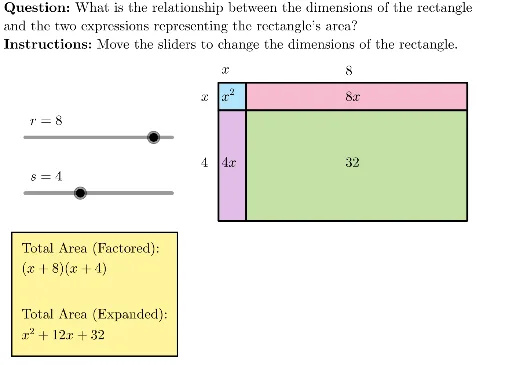
This example demonstrates the construction and manipulation of an area model through dynamic geometry, visually illustrating methods for calculating the area of geometric shapes. It involves core mathematical concepts such as area, quadratic equations, linear equations, calculus, dilation, integers, and special points. The construction utilizes GeoGebra commands and objects like LaTeX, polygon, text, slider, initialize, question, instructions, and area expressions. Suitable for high school mathematics education, it helps students understand the connection between geometry and algebra, enhancing spatial reasoning skills.
GeoGebra Commands & Parameters
LaTeX((((("\text{" * QUESTION) * "\\") * INSTRUCTIONS) * "}")) → TEXTPolygon({(1, -1), (1 + r, -1), (1 + r, -1 - s), (1, -1 - s)}) → A4Polygon({(0, 0), (1, 0), (1, -1), (0, -1)}) → A1Polygon({(0, 0), (1, 0), (1, -1), (0, -1)}) → A1borderPolygon({(1, 0), (1 + r, 0), (1 + r, -1), (1, -1)}) → A2Polygon({(1, 0), (1 + r, 0), (1 + r, -1), (1, -1)}) → A2borderPolygon({(0, -1), (1, -1), (1, -1 - s), (0, -1 - s)}) → A3Polygon({(0, -1), (1, -1), (1, -1 - s), (0, -1 - s)}) → A3borderText("x", (0, 0.75), true, true) → labelDPolygon({(1, -1), (1 + r, -1), (1 + r, -1 - s), (1, -1 - s)}) → A4borderText("x^2", (0, -0.1), true, true) → labelAText("\vphantom{x^2}x", (-0.75, -0.1), true, true) → labelFLaTeX(("r=" * r)) → rLabelLaTeX(("s=" * s)) → sLabelText((("\vphantom{x^2}" * If[r ≟ 1, "", "" + r]) * "x"), (1 + (r - 1) / 2, -0.1), true, true) → labelBText((("\vphantom{x^2}" * If[s ≟ 1, "", "" + s]) * "x"), (0, -1 - (s - 1) / 2), true, true) → labelCText(r, (1 + (r - 1) / 2, 0.75), true, true) → labelEText(("\vphantom{x^2}" * s), (-0.75, -1 - (s - 1) / 2), true, true) → labelGText("\vphantom{x^2}" + ((r * s)), (1 + (r - 1) / 2, -1 - (s - 1) / 2), true, true) → labelJ