
Q4 - Q7
Loading the math board and drawing, please wait…
In collections
Exploring Parallel Lines in the Coordinate Plane
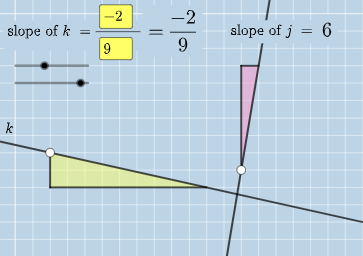
This example demonstrates geometric constructions involving angles, straight lines, and parametric curves. Using GeoGebra commands such as Intersect, Angle, and Textfield, complex geometric shapes can be constructed. Suitable for high school mathematics education and learning.
GeoGebra Commands & Parameters
Intersect(k, j) → CAngle(A, C, B) → αIntersect(k, eq3) → DAngle(A, D, B) → βIntersect(j, eq4) → EAngle(A, E, B) → γTextfield(a) → InputBox1Textfield(b) → InputBox2Textfield(c) → InputBox3Textfield(d) → InputBox4Polygon(A, F, G) → t1, g, a_1, fSegment(A, F) → hSegment(F, G) → iFractionText(a / b) → text4FractionText(c / d) → text5Polygon(B, H, I) → t2, i_1, b_1, h_1Segment(B, H) → lSegment(H, I) → m
AI Drawing Prompt Reference
Draw a geometric construction involving two intersecting lines and parametric curves. Mark the intersection point of the lines, measure and label three angles. Then, construct new points and segments by intersecting lines with curves, forming two polygons. Add four text boxes for inputting parameter values and display two fraction texts, showcasing a complex geometric construction process.
The prompt above was compiled from the original drawing commands and is for reference only.