
Right Circular Cone Construction and Geometric Demonstration
Loading the math board and drawing, please wait…
In collections
geometriadinamica.es
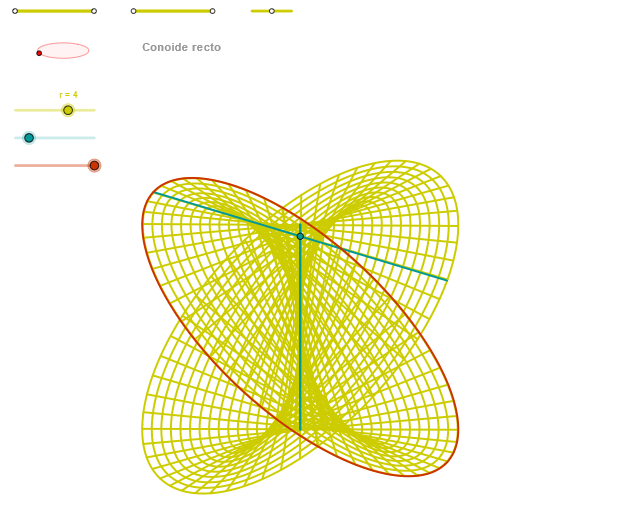
① This example demonstrates how to precisely construct a right circular cone in GeoGebra, showing its generatrices, base circle, apex, and related angle relationships. ② Core mathematical concepts include solid geometry definitions of a cone, generatrix, base circle, apex, axis, and the angle between the slant height and base radius. ③ Construction highlights: from the summary, it uses Segment (for generatrices), Point (for apex and base center), OrthogonalLine (for the axis), Circle (for the base), Intersect (for endpoints), Ellipse (for perspective base), Angle (to mark key angles), CurveCartesian and Sequence (possibly for dynamic points or loci). ④ Suitable for high school solid geometry teaching or introductory analytic geometry in university, helping students intuitively understand the components of a cone and spatial relationships, and can be used for dynamic demonstrations of cone generation.
GeoGebra Commands & Parameters
Segment(Q5, Q6) → p5Point(p5) → P5Segment(Q3, Q4) → p2Point(p2) → P3Segment(P3, Q4) → p4Point(p4) → P4Segment(Q1, Q2) → p1Point(p1) → P1Segment(P1, Q2) → p3Point(p3) → P2OrthogonalLine(C, xAxis) → zz2Circle(C, 0.62) → zz0Intersect(zz0, zz2, 1) → ZZ4Intersect(zz0, zz2, 2) → ZZ3Ellipse(ZZ3, ZZ4, 0.65) → zElipse2Point(zElipse2) → ZIntersect(zElipse2, zz2) → ZZ7, ZZ8Angle(ZZ8, C, Z) → zAngIncOrthogonalLine(C, yAxis) → zz1Intersect(zz0, zz1, 2) → ZZ2Intersect(zz0, zz1, 1) → ZZ1Ellipse(ZZ1, ZZ2, 0.65) → zElipse1Point(zElipse1) → XYIntersect(zElipse1, zz1) → ZZ5, ZZ6Angle(ZZ6, C, XY) → zAngRotSegment(ZZ5, ZZ6) → zz4Segment(ZZ7, ZZ8) → zz3Intersect(zElipse2, zElipse1, 1) → zPunto1Intersect(zElipse2, zElipse1, 4) → zPunto2Segment(zPunto1, zPunto2) → zSeg2CurveCartesian((r / 2 * (((v * cos(α)) * sin(zAngRot)) + ((v * sin(α)) * cos(zAngRot)))), (r / 2 * (((((-v) * cos(α)) * cos(zAngRot)) * sin(zAngInc)) + (((v * sin(α)) * sin(zAngRot)) * sin(zAngInc)) + ((2 * sin(α)) * cos(zAngInc)))), v, v1, v2) → curva2CurveCartesian((r / 2 * (((β * cos(u)) * sin(zAngRot)) + ((β * sin(u)) * cos(zAngRot)))), (r / 2 * (((((-β) * cos(u)) * cos(zAngRot)) * sin(zAngInc)) + (((β * sin(u)) * sin(zAngRot)) * sin(zAngInc)) + ((2 * sin(u)) * cos(zAngInc)))), u, u1, u2) → a1CurveCartesian(0, (((r / 2 * 2) * sin(u)) * cos(zAngInc)), u, u1, u2) → curva1Sequence(CurveCartesian[(r / 2 * (((v * cos(u)) * sin(zAngRot)) + ((v * sin(u)) * cos(zAngRot)))), (r / 2 * (((((-v) * cos(u)) * cos(zAngRot)) * sin(zAngInc)) + (((v * sin(u)) * sin(zAngRot)) * sin(zAngInc)) + ((2 * sin(u)) * cos(zAngInc)))), u, u1, u2], v, v1, v2, paso) → list2Sequence(CurveCartesian[(r / 2 * (((v * cos(u)) * sin(zAngRot)) + ((v * sin(u)) * cos(zAngRot)))), (r / 2 * (((((-v) * cos(u)) * cos(zAngRot)) * sin(zAngInc)) + (((v * sin(u)) * sin(zAngRot)) * sin(zAngInc)) + ((2 * sin(u)) * cos(zAngInc)))), v, v1, v2], u, u1, u2, paso) → list1
AI Drawing Prompt Reference
Draw a geometric construction of a right circular cone. The figure should include the generatrix lines, the base circle, the apex, and the axis. Also show the angle between the axis and the base circle, and the angle between the generatrix and the base radius. Use ellipses and intersection points to depict the perspective of the cone, and mark key angles. The overall figure should clearly show the components of the cone and spatial relationships, suitable for geometry teaching or dynamic demonstrations.
The prompt above was compiled from the original drawing commands and is for reference only.