
Q3 Math Example
Loading the math board and drawing, please wait…
In collections
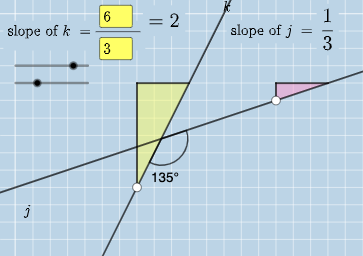
Exploring Perpendicular Lines in the Coordinate Plane
This example demonstrates the geometric construction of polygons and angle measurement; involves core math concepts like algebra, angles, difference and slope, coordinate geometry, and plane geometry; constructed using GeoGebra commands/objects such as Intersect, Angle, Textfield, Polygon, Segment, FractionText; suitable for high school students learning geometric constructions and applications of related math concepts.
GeoGebra Commands & Parameters
Intersect(k, j) → CAngle(A, C, B) → αIntersect(k, eq3) → DAngle(A, D, B) → βIntersect(j, eq4) → EAngle(A, E, B) → γTextfield(a) → InputBox1Textfield(b) → InputBox2Textfield(c) → InputBox3Textfield(d) → InputBox4Polygon(A, F, G) → t1, g, a_1, fSegment(A, F) → hSegment(F, G) → iFractionText(a / b) → text4FractionText(c / d) → text5Polygon(B, H, I) → t2, i_1, b_1, h_1Segment(B, H) → lSegment(H, I) → m
AI Drawing Prompt Reference
On a coordinate plane, draw two intersecting lines and mark their main vertex as A. From A, construct rays that form three angles in sequence, labeled α, β, and γ, using the appropriate points where the rays meet the given lines (intersections such as C, D, and E define the ray directions). Using these rays and their intersection points, draw one polygon with the required vertices on the first side of A, and another polygon with the required vertices on the second side of A so the two figures share the underlying construction. Add the corresponding boundary segments that form the sides of each polygon.
The prompt above was compiled from the original drawing commands and is for reference only.