
Pythagorean Tree
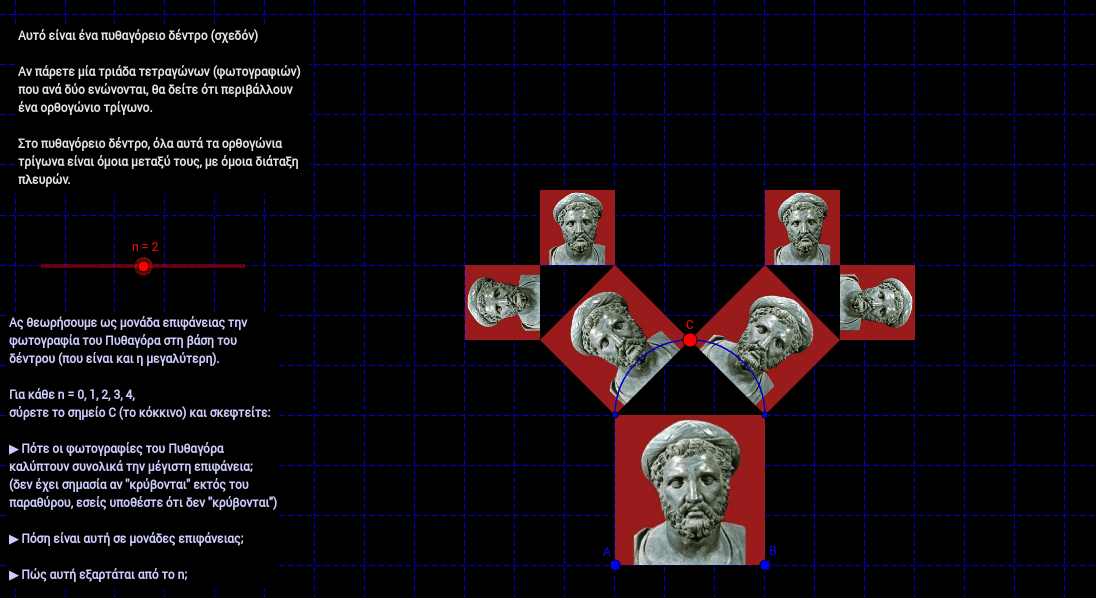
Loading the math board and drawing, please wait…
This example demonstrates a dynamic Pythagorean tree and the area it covers. It illustrates the Pythagorean theorem and basic concepts of fractal geometry. Constructed using GeoGebra commands such as Segment, Rotate, Semicircle, etc. Suitable for middle school and above students to learn geometric construction and fractal geometry.
GeoGebra Commands & Parameters
Segment(A, B) → aRotate(B, 90*°, A) → B'Rotate(A, 270*°, B) → A'Semicircle(B', A') → dPoint(d) → CSegment(C, A') → bSegment(C, B') → cIf(B' ≠ C, Angle[A', B', C], 1.5707963267948966) → gonia
AI Drawing Prompt Reference
Draw a dynamic Pythagorean tree, showing the formed triangle and its area coverage. Start by drawing a line segment, then rotate it around one endpoint to form a right angle, and rotate the other segment around the other endpoint. Next, draw semicircles with the two segments as diameters, connect the intersection point of the semicircles with the endpoints to form new segments. Finally, calculate the angles of the newly formed triangle to illustrate the fractal geometry features.
The prompt above was compiled from the original drawing commands and is for reference only.