
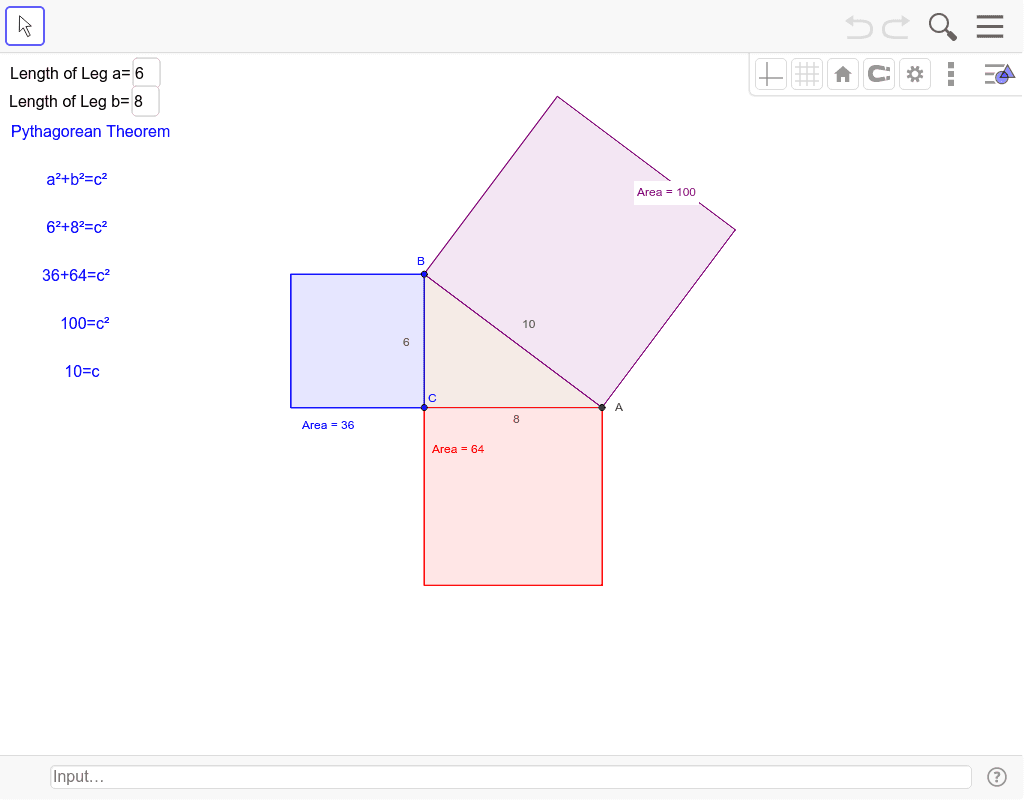
Pythagorean Theorem Dynamic Demo by Mr. Krebs
Loading the math board and drawing, please wait…
In collections
Grade 8 Congruence and Transformations
This example dynamically demonstrates the geometric meaning of the Pythagorean theorem in right-angled triangles, showing the relationship among the three sides through transformations like rotation, dilation, and reflection; Core math concepts include Pythagorean theorem, angles, transformations, and polygon construction; Construction highlights involve GeoGebra commands/objects such as Rotate, Angle, Dilate, Polygon, Mirror, Textfield, and Distance; Suitable for high school mathematics teaching, illustrating the integration of geometric transformations and algebraic relationships.
GeoGebra Commands & Parameters
Rotate(C, 270*°, C_1) → D'Angle(D', C_1, C) → βDilate(C_1, e, C) → BPolygon(C_1, D', 4) → poly1, c, d, e_1, f_1, A_1, B_1Mirror(A_1, C) → A'Dilate(A', f, C) → APolygon(B, C, A) → poly2, a'', c', d_1Polygon(C, B, 4) → poly3, a, b, g, h, D, EPolygon(A, C, 4) → poly4, i, j, k, l, F, GPolygon(B, A, 4) → poly5, m, n, p, q, H, ITextfield(e) → inputBox1Textfield(f) → inputBox2Distance(c', a'') → o
AI Drawing Prompt Reference
Draw a right triangle to demonstrate the Pythagorean theorem geometrically. Rotate a point by 270 degrees, measure angles, and calculate side lengths. Construct multiple squares using these points to show the relationship between their areas. Add text boxes for parameters and connect key points with lines to highlight the integration of geometric transformations and algebraic relationships.
The prompt above was compiled from the original drawing commands and is for reference only.