
Dilation Transformation Demo by Mr. Krebs
Loading the math board and drawing, please wait…
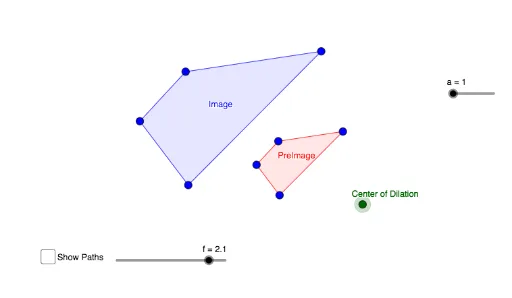
This example demonstrates the effect of a geometric dilation on shapes, involving core concepts like dilation, scale factor, and geometric construction. It utilizes commands such as Polygon, Dilate, Line, Angle, Segment, Rotate, Ray, Intersect, TableText, and Textfield. Suitable for high school students learning geometric transformations.
GeoGebra Commands & Parameters
Polygon(B, C, D, E) → PreImage, b_1, c_1, d_1, e_1Dilate(B, f, A) → B'Dilate(C, f, A) → C'Dilate(D, f, A) → D'Dilate(E, f, A) → E'Polygon(B', C', D', E') → Image, b', c', d', e'Line(B, A) → gLine(A, C) → hLine(A, D) → iLine(A, E) → jPolygon(F, G, H, I) → q1, f_1, g_1, h_1, i_1Dilate(F, Factor_1, J) → F'Dilate(G, Factor_1, J) → G'Dilate(H, Factor_1, J) → H'Dilate(I, Factor_1, J) → I'Polygon(F', G', H', I') → q1', f', g', h', i'Polygon(L, M, N) → t1, n, l, mDilate(L, Factor, P) → L'_1Dilate(M, Factor, P) → M'_1Dilate(N, Factor, P) → N'_1Polygon(L'_1, M'_1, N'_1) → t1', n', l', m'Angle(t1) → α, β, γSegment(N', M') → pRotate(N', β, M') → O'_2Angle(N', M', O'_2) → δRotate(M', (-γ), N') → Q'_2Angle(Q'_2, N', M') → εRay(M', O'_2) → qRay(N', Q'_2) → rIntersect(r, q) → L'Polygon(M', L', N') → t2, n'_1, m'_1, l'_1Polygon(O, Q, R, S) → q2, o, q_1, r_1, sDilate(O, t, T) → O'Dilate(Q, t, T) → Q'Dilate(R, t, T) → R'Dilate(S, t, T) → S'Polygon(O', Q', R', S') → q2', o'_1, q'_1, r', s'Segment(R, T) → k_1Segment(R', T) → j_1TableText({{A1, B1, C1}, {A2, B2, C2}, {A3, B3, C3}}, "|_lll") → text4Textfield(m_1) → InputBox1Polygon(U, V, W, Z) → q3, u_1, v_1, w_1, z_1
AI Drawing Prompt Reference
Draw a pentagon ABCDE and then perform an enlargement transformation centered at point A to get a new pentagon A'B'C'D'E'. Draw lines from point A to points B, C, D, and E. Then draw a quadrilateral FGHI and perform an enlargement transformation centered at point J to get a new quadrilateral F'G'H'I'. Draw a triangle LMN and perform an enlargement transformation centered at point P to get a new triangle L'M'N'. Draw the angle bisectors of triangle L'M'N', rotate points N' and M', and draw new segments and angles. Finally, draw a quadrilateral OQRS and perform an enlargement transformation centered at point T to get a new quadrilateral O'Q'R'S'.
The prompt above was compiled from the original drawing commands and is for reference only.