
Pyramid Cross Sections Investigation
Loading the math board and drawing, please wait…
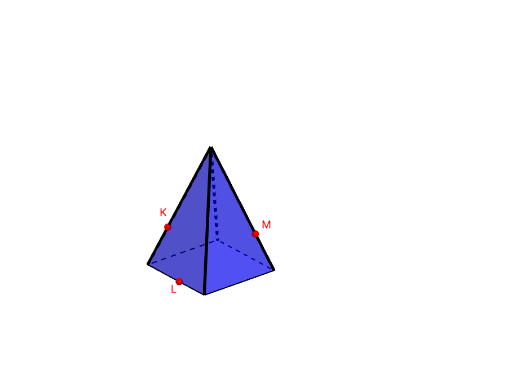
This example demonstrates the geometric shapes formed by cross-sections created by slicing through pyramids with different base shapes. It involves core math concepts like solid geometry, cross-section geometry, geometric mean, and linear regression. The construction uses GeoGebra commands and objects such as Point, Polygon, Circle, Center, Pyramid, If, IntersectPath. Suitable for high school students and math enthusiasts exploring solid geometry and cross-section problems.
GeoGebra Commands & Parameters
Point(yAxis) → APoint(xAxis) → BPolygon(A, B, Base) → poly1, a, D, G, H, I, J, e, f, g, j, k, l, m, CCircle(A, B, C) → hCenter(h) → EPyramid(poly1, F) → i, faceABF, edgeBF, edgeCF, edgeDF, edge1, edge2, edge3, edge4, faceBCF, faceCDF, faceADF, face1, face2, face3, face4, edgeAFPoint(If[Base ≟ 3, list6, If[Base ≟ 4, list5, If[Base ≟ 5, list4, If[Base ≟ 6, list3, If[Base ≟ 7, list2, list1]]]]]) → KPoint(If[Base ≟ 3, list6, If[Base ≟ 4, list5, If[Base ≟ 5, list4, If[Base ≟ 6, list3, If[Base ≟ 7, list2, list1]]]]]) → MPoint(If[Base ≟ 3, list6, If[Base ≟ 4, list5, If[Base ≟ 5, list4, If[Base ≟ 6, list3, If[Base ≟ 7, list2, list1]]]]]) → LIf(w ≟ 0, Plane[M, L, K], If[w ≟ 1, Plane[A_1, Z, W], Plane[B_1, D_1, C_1]]) → oIntersectPath(o, i) → poly2, N, p, q, r, s, t, a_1, b_1, c_1, d_1, O, P, Q, R, S, T, U, V
AI Drawing Prompt Reference
Draw a pyramid with a base that can be a triangle, quadrilateral, pentagon, hexagon, or heptagon, showing the geometric shapes formed by slicing through it at different positions. Use distinct colored lines to represent the intersections between the cross-sections and the pyramid, highlighting the connection between solid geometry and cross-section geometry.
The prompt above was compiled from the original drawing commands and is for reference only.