
Pyramid Construction by Ashar_Arabi
Loading the math board and drawing, please wait…
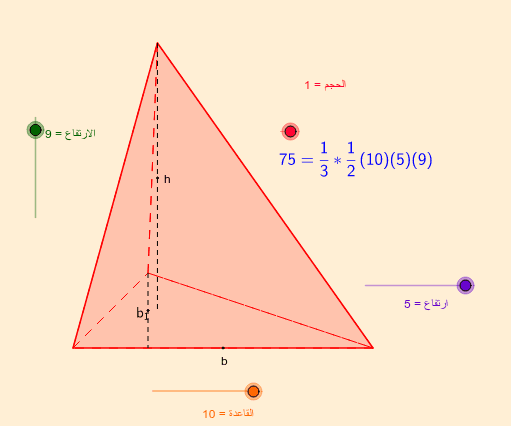
This example demonstrates the construction of a pyramid. Key mathematical concepts include plane geometry, quadrilaterals, and triangles, as well as solid geometry. Using GeoGebra commands such as Line, Polygon, and Segment, a pyramid model can be constructed. Suitable for middle and high school students studying solid geometry.
GeoGebra Commands & Parameters
Line(J, K) → hCircle(J, ارتفاع) → gIntersect(g, h, 1) → MVector(J, M) → wDilate(I, القاعدة, H) → LVector(H, L) → vTranslate(A, v) → BMidpoint(A, B) → CMidpoint(C, A) → DTranslate(D, Vector[w / 2]) → NAngularBisector(A, N, B) → lAngularBisector(B, A, N) → kIntersect(k, l) → ODilate(F, الارتفاع, E) → GVector(E, G) → uTranslate(O, u) → D_1Circle(J, 1) → dPolygon(A, N, B) → P, b, a, nPolygon(D_1, A, N) → Q, n_1, n', a_1Polygon(D_1, B, N) → R, n_2, n'_1, b_1Polygon(A, D_1, B) → S, b_2, a_2, n'_2Segment(N, D) → cMidpoint(N, D) → TIf(VolumeFormula ≟ 1, U) → ZIf(الحجم ≟ 1, V) → A_1Segment(D_1, O) → mMidpoint(D_1, O) → C_1
AI Drawing Prompt Reference
Draw a pyramid model. Start by drawing two vertices J and K for the base, then draw the diagonal connecting them. Next, draw a circle centered at J, find its intersection M with the diagonal, and connect JM. Draw a line parallel to JK through M, find its intersection L with the circle, and connect IL. Then, draw a unit circle centered at J, find its intersection F with IL, and connect FL. Finally, connect the points to form the pyramid's faces.
The prompt above was compiled from the original drawing commands and is for reference only.