
Cone Volume by Ashar_Arabi (2)
Loading the math board and drawing, please wait…
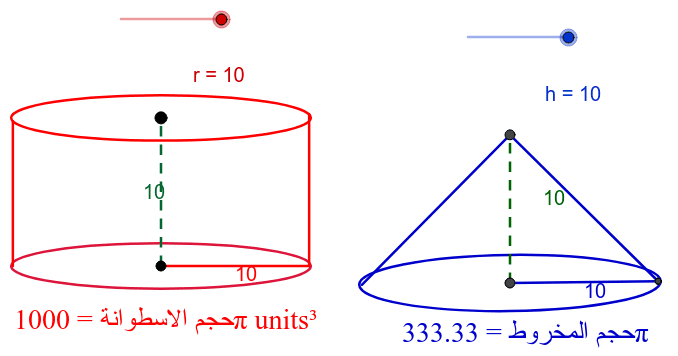
This example demonstrates the calculation of a cone's volume. Key mathematical concepts include the formula for the volume of a cone. Using GeoGebra commands such as Circle, Point, Line, Intersect, etc., a cone is constructed and its volume is calculated. Suitable for high school mathematics education and learning.
GeoGebra Commands & Parameters
Circle(A, r) → cPoint(c) → BLine(B, A) → aIntersect(c, a) → C, DPoint(c) → ELine(E, A) → bPoint(b) → FPoint(b) → GEllipse(B, D, G) → dPoint(Circle[A, h]) → HSegment(A, H) → eRotate(A, 90*°, A) → A'Rotate(H, 90*°, A) → H'Segment(A', H') → e'Vector(A, H') → uTranslate(d, u) → d'OrthogonalLine(B, e) → fOrthogonalLine(H, e) → gIntersect(d', f) → I, JIntersect(d', g) → K, LSegment(B, I) → iSegment(H, K) → jSegment(A, D) → kOrthogonalLine(D, k) → lIntersect(d', l) → N, OSegment(O, D) → mCircle(P, r) → pPoint(p) → QLine(P, Q) → nOrthogonalLine(P, n) → qRotate(P, 30*°, Q) → P'Angle(P, Q, P') → αLine(Q, P') → sRotate(P, 330*°, Q) → P'_1Angle(P'_1, Q, P) → βLine(Q, P'_1) → tIntersect(t, s) → RIntersect(q, t) → SIntersect(s, q) → TLine(P, Q) → a_1OrthogonalLine(P, a_1) → b_1Rotate(P, 15*°, Q) → P'_2Angle(P, Q, P'_2) → γRotate(P, 345*°, Q) → P'_3Angle(P'_3, Q, P) → δLine(Q, P) → c_1Line(Q, P) → d_1Intersect(p, d_1) → U, VEllipse(V, Q, W) → e_1Segment(P, Q) → f_1Point(e_1) → A_1Point(Circle[P, h]) → ZSegment(P, Z) → g_1Rotate(Z, 90*°, P) → Z'Segment(P, Z') → h_1Segment(V, Z') → i_1Segment(Z', Q) → j_1
AI Drawing Prompt Reference
Draw a cone to demonstrate the calculation of its volume. Start by creating a circle and a point on it, then connect the point to the center to form a line, intersecting the circle at two points. Draw a perpendicular from the center to this line, intersecting the circle at another point. Create an ellipse with these two points as foci and the center as the new focus. Then, draw a vertical line from the center intersecting the ellipse at two points. Rotate the cone's side to create a 3D effect, labeling key points and lines, and finally display the cone with its volume calculation-related geometric relationships.
The prompt above was compiled from the original drawing commands and is for reference only.