
Pyramid and Cube by eranderson
Loading the math board and drawing, please wait…
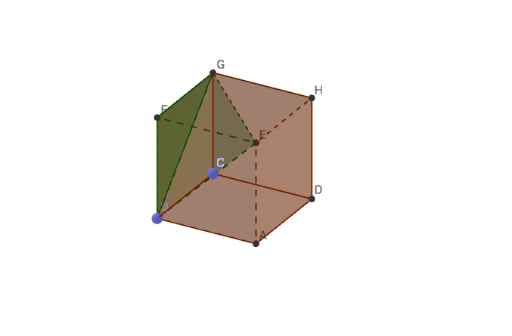
This example demonstrates the geometric relationship and surface properties between a pyramid and a cube. It involves core math concepts like solid geometry, polygons, face-body relationships, and geometric construction. Key GeoGebra commands used include Intersect, Point, Cube, and Pyramid to create vertices, edges, faces, and the solids themselves. Suitable for high school geometry teaching or construction practice to understand the composition and characteristics of 3D shapes.
GeoGebra Commands & Parameters
Intersect(xAxis, zAxis) → APoint(xAxis) → BPoint(Circle[B, Distance[A, B], Segment[A, B]]) → CCube(A, B, C) → a, D, faceCDHG, faceEFGH, edgeAD, edgeAB, edgeBC, edgeCD, edgeAE, edgeDH, edgeEH, edgeEF_1, E, edgeBF_1, edgeFG_1, edgeCG, edgeGH, F, G, H, faceABCD, faceADHE, faceABFE, faceBCGFPyramid(E, B, G, F) → b, faceBEG, edgeFG, faceBEF, faceBFG, faceEFG, edgeBE, edgeBG, edgeEG, edgeEF, edgeBF
AI Drawing Prompt Reference
Draw a cube and a pyramid. Start by creating point A at the intersection of the x-axis and z-axis, then create point B on the x-axis. Next, draw a circle with center A and radius AB, and take point C on the circle. Use points A, B, and C to create a cube a. Finally, create a pyramid b with vertices E, B, G, and F.
The prompt above was compiled from the original drawing commands and is for reference only.