
Proportional Division
Loading the math board and drawing, please wait…
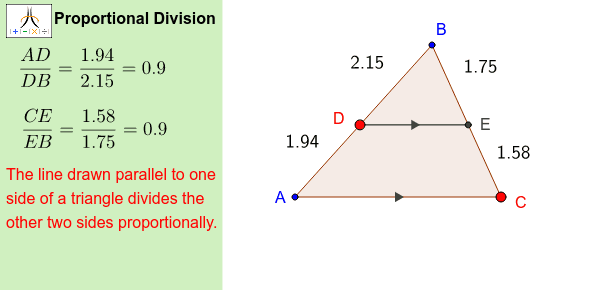
This example demonstrates the concept of proportional division using geometric shapes. It involves core mathematical concepts such as ratios, area, inequalities, and geometric constructions. The construction utilizes GeoGebra commands/objects like Polygon, Point, Line, Intersect, Distance, Segment, Midpoint, and Corner. It is suitable for middle school students and above to learn about ratios, area, and inequalities, or for mathematical teaching demonstrations.
GeoGebra Commands & Parameters
Polygon(A, B, C) → poly1, c, a, bPoint(poly1) → DLine(D, b) → dIntersect(d, a) → EDistance(A, D) → distanceADDistance(D, B) → distanceDBDistance(C, E) → distanceCEDistance(E, B) → distanceEBSegment(D, E) → eMidpoint(b) → FMidpoint(e) → GCorner(1, 1) → Cnr1Corner(1, 2) → Cnr2Corner(1, 3) → Cnr3Corner(1, 4) → Cnr4Polygon(CN1, CN2, CN3, CN4) → Panel, cn1, cn2, cn3, cn4
AI Drawing Prompt Reference
Draw a geometric shape to demonstrate the concept of proportional division, including a polygon and several points, lines, and segments. Start by drawing a polygon, then find a point inside it and draw a perpendicular line from this point to one side of the polygon to find the intersection point. Next, measure the relevant distances and connect specific points to form new segments. Finally, draw a new polygon outside the original one using four points to show the relationship between ratios and areas.
The prompt above was compiled from the original drawing commands and is for reference only.