
Properties of Kite by GMMDC
Loading the math board and drawing, please wait…
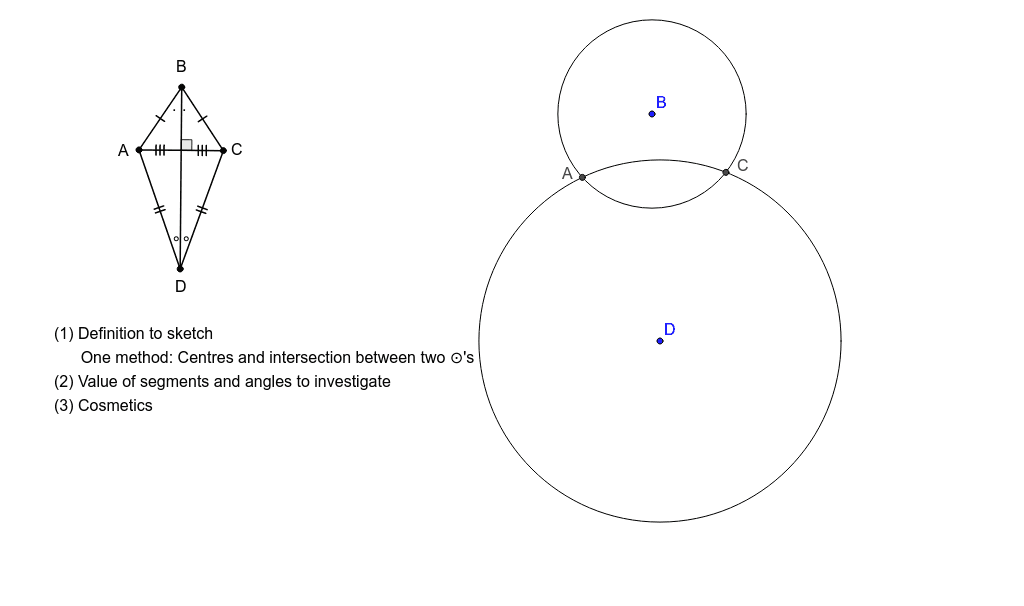
This example demonstrates the properties of a kite, a special quadrilateral where the diagonals are perpendicular. By constructing a kite, we can observe its diagonal properties and area calculation methods. Commands used include Segment, Circle, Point, Ray, OrthogonalLine, Intersect, Angle, and Polygon. Suitable for middle school and above students to learn geometric construction and property exploration.
GeoGebra Commands & Parameters
Segment(A_1, B_1) → aCircle(A_1, B_1) → cCircle(B_1, A_1) → dPoint(d) → C_1Ray(B_1, C_1) → bSegment(C_1, B_1) → eSegment(A_1, C_1) → fOrthogonalLine(B_1, f) → gPoint(g) → D_1Segment(D_1, C_1) → hSegment(D_1, A_1) → iIntersect(g, f) → E_1Angle(C_1, E_1, B_1) → αSegment(D_1, B_1) → jIntersect(j, f) → ESegment(E, A_1) → kSegment(E, C_1) → lPolygon(A_1, B_1, C_1) → poly1, c_1, a_1, b_1Polygon(A_1, D_1, C_1) → poly2, c_2, a_2, d_1Circle(B, G) → pCircle(D, I) → qIntersect(p, q, 2) → AIntersect(p, q, 1) → C
AI Drawing Prompt Reference
Draw a kite ABCD with perpendicular diagonals AC and BD. First, draw two circles with centers A and B and radius AB, and let their intersection point C be one vertex of the kite. Then, draw a ray from B to C, and line segments BC and AC. Next, draw a line perpendicular to AC through C, and let its intersection with AC be point D, the other vertex of the kite. Connect points A, B, C, and D to form the kite ABCD. Finally, draw the diagonals AC and BD to observe their perpendicular relationship.
The prompt above was compiled from the original drawing commands and is for reference only.