
Properties of Isosceles Triangles by Martin Flashman (2)
Loading the math board and drawing, please wait…
In collections
Mapping Diagrams: From AB to C&DE, Resource
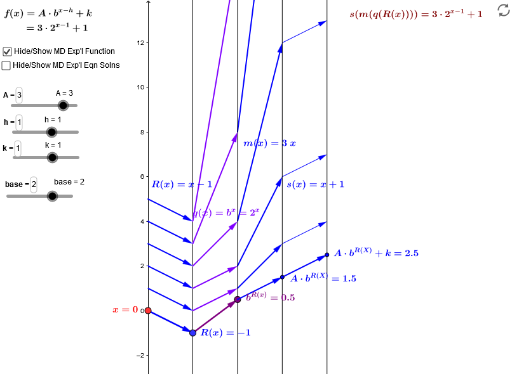
This example demonstrates the properties of isosceles triangles, including their definition, properties, and related logical reasoning. Using GeoGebra commands such as Point, Vector, and Sequence, a dynamic isosceles triangle model is constructed, showcasing its symmetry and properties of the median to the base. Suitable for middle school and above students to learn geometric construction and logical reasoning.
GeoGebra Commands & Parameters
Point(i) → KPoint(yAxis) → A_xVector(A_x, B_x) → uVector(B_x, C_x) → vTextfield(m) → inputBox1Textfield(s) → inputBoxfSequence(Vector[(6, m(core(R(i)))), (8, s(m(core(R(i)))))], i, 1, 5) → QuadgvlistSequence(Vector[(4, core(R(i))), (6, m(core(R(i))))], i, 1, 5) → QuadmvlistSequence(Vector[(0, i), (2, R(i))], i, 1, 5) → QuadRvlistSequence(Vector[(2, R(i)), (4, core(R(i)))], i, 1, 5) → QuadqvlistVector(K, s_{inv}D) → wVector(s_{inv}D, m_{invSinvD}) → zVector(m_{invSinvD}, q_{inv+}) → dVector(q_{inv+}, I) → h_1Sequence(Vector[(0, i), (2, m(i))], i, -2, 2) → LinmvlistSequence(Vector[(2, m(i)), (4, s(m(i)))], i, -2, 2) → LingvlistTextfield(h) → inputBox2Textfield(k) → inputBox3Textfield(A) → inputBox4Textfield(base) → inputBox5Vector(C_x, D_x) → fVector(D_x, E_x) → g
AI Drawing Prompt Reference
Draw a dynamic isosceles triangle to demonstrate its definition, properties, and logical reasoning. Start by plotting the base and vertex, then use vectors to construct the two equal sides of the triangle, and mark the midpoint of the base and the axis of symmetry. Next, represent the altitude, median, and angle bisector of the vertex angle with vectors, dynamically showing the relationships among them. Finally, add text boxes to input the base length and vertex height, adjust the triangle dynamically, and display related measurements.
The prompt above was compiled from the original drawing commands and is for reference only.