
Cube and Vector Relationship Demonstration
Loading the math board and drawing, please wait…
In collections
Mapping Diagrams: From AB to C&DE, Resource
This example demonstrates the relationship between points, vectors, and faces in a cuboid. Core math concepts include vectors, coordinate geometry, and solid geometry. Construction highlights involve commands like If, Point, Vector, Textfield, Segment, Zip, Element, and Midpoint to create geometric objects such as points, vectors, segments, and midpoints, forming the cuboid and related elements. Suitable for high school students and math enthusiasts learning solid geometry and vector concepts.
GeoGebra Commands & Parameters
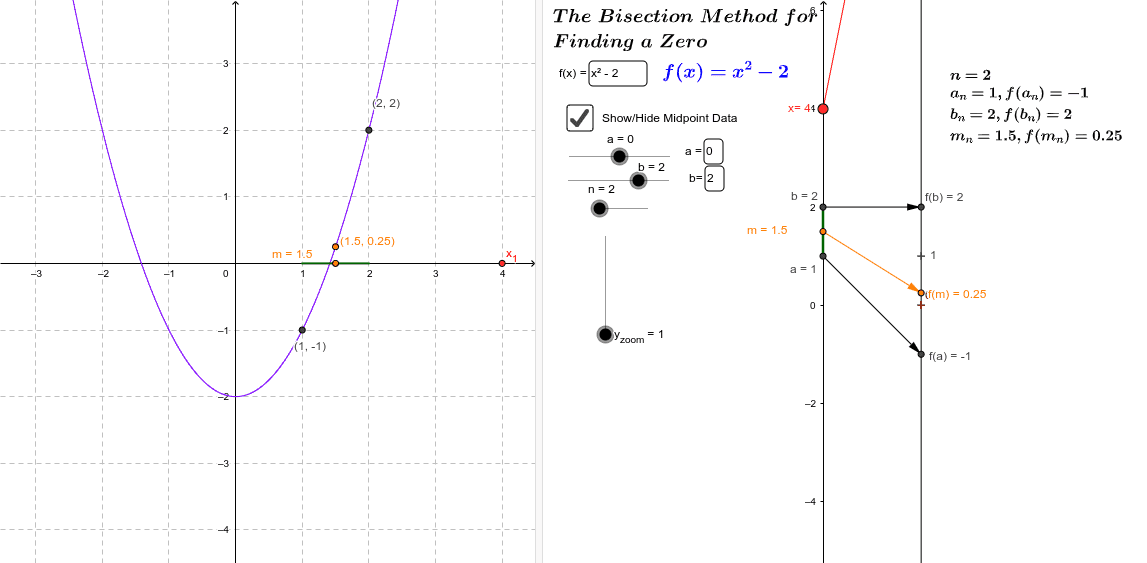
If((D2 * F2) < 0, A2, C2) → A3If((E2 * F2) < 0, B2, C2) → B3If((E3 * F3) < 0, B3, C3) → B4If((D3 * F3) < 0, A3, C3) → A4If((E4 * F4) < 0, B4, C4) → B5If((D4 * F4) < 0, A4, C4) → A5If((E5 * F5) < 0, B5, C5) → B6If((D5 * F5) < 0, A5, C5) → A6If((E6 * F6) < 0, B6, C6) → B7If((D6 * F6) < 0, A6, C6) → A7If((E7 * F7) < 0, B7, C7) → B8If((D7 * F7) < 0, A7, C7) → A8If((E8 * F8) < 0, B8, C8) → B9If((D8 * F8) < 0, A8, C8) → A9If((E9 * F9) < 0, B9, C9) → B10If((D9 * F9) < 0, A9, C9) → A10If((E10 * F10) < 0, B10, C10) → B11If((D10 * F10) < 0, A10, C10) → A11If((E11 * F11) < 0, B11, C11) → B12If((D11 * F11) < 0, A11, C11) → A12If((E12 * F12) < 0, B12, C12) → B13If((D12 * F12) < 0, A12, C12) → A13If((E13 * F13) < 0, B13, C13) → B14If((D13 * F13) < 0, A13, C13) → A14If((E14 * F14) < 0, B14, C14) → B15If((D14 * F14) < 0, A14, C14) → A15If((E15 * F15) < 0, B15, C15) → B16If((D15 * F15) < 0, A15, C15) → A16If((E16 * F16) < 0, B16, C16) → B17If((D16 * F16) < 0, A16, C16) → A17If((E17 * F17) < 0, B17, C17) → B18If((D17 * F17) < 0, A17, C17) → A18If((E18 * F18) < 0, B18, C18) → B19If((D18 * F18) < 0, A18, C18) → A19If((E19 * F19) < 0, B19, C19) → B20If((D19 * F19) < 0, A19, C19) → A20If((E20 * F20) < 0, B20, C20) → B21If((D20 * F20) < 0, A20, C20) → A21If((E21 * F21) < 0, B21, C21) → B22If((D21 * F21) < 0, A21, C21) → A22If((E22 * F22) < 0, B22, C22) → B23If((D22 * F22) < 0, A22, C22) → A23If((E23 * F23) < 0, B23, C23) → B24If((D23 * F23) < 0, A23, C23) → A24If((E24 * F24) < 0, B24, C24) → B25If((D24 * F24) < 0, A24, C24) → A25Point(yAxis) → x_0Vector(x_0, B) → uTextfield(f) → inputBox1Textfield(f) → inputBox2Textfield(a) → inputBox3Segment((0, Element[a_*, n]), (0, Element[b_*, n])) → cTextfield(b) → inputBox4Zip((0, b), b, b_*) → bMDZip((a, f(a)), a, b_*) → bGraphptsZip(Vector[(0, a), (2, (y_{zoom} * f(a)))], a, b_*) → bArrowMDZip(Vector[(0, V), (2, (y_{zoom} * f(V)))], V, a_*) → aArrowMDZip((V, f(V)), V, a_*) → aGraphptsZip((0, V), V, a_*) → aMDZip((2, (y_{zoom} * f(V))), V, a_*) → faMDZip((2, (y_{zoom} * f(V))), V, b_*) → fbMDElement(aMD, n) → a_nElement(bMD, n) → b_nElement(aArrowMD, n) → aArr_nElement(bArrowMD, n) → bArr_nElement(bGraphpts, n) → bgr_nElement(aGraphpts, n) → agr_nElement(faMD, n) → fa_nElement(fbMD, n) → fb_nSegment((y(a_n), 0), (y(b_n), 0)) → dMidpoint(c) → m_nMidpoint(d) → mgr_1Vector(m_n, fm_n) → mArr_n
AI Drawing Prompt Reference
Draw a cuboid and demonstrate the relationship between vectors and its faces. First, determine the vertices of the cuboid. Then, create vectors from the origin to each vertex. Next, draw the faces of the cuboid and mark the intersection points of the vectors with the faces. Finally, add text to explain the relationship between the vector directions and the face planes, making the entire graphic clear and understandable.
The prompt above was compiled from the original drawing commands and is for reference only.