
Proof Without Words: Constructing the 3-4-5 Right Triangle
Loading the math board and drawing, please wait…
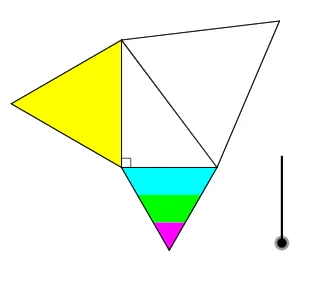
This example provides a “proof without words” for the classic 3-4-5 right triangle by visually encoding the needed length/area relationships into a geometric construction. It highlights core ideas from Euclidean geometry: right triangles, the Pythagorean theorem (a^2 + b^2 = c^2), and how geometric transformations preserve structure. The construction uses GeoGebra tools such as Point to create key vertices (A, B, C, and others), Polygon to form triangle and auxiliary regions (poly1, poly2, poly3), Dilate to scale figures and align side lengths, Angle to control/verify the crucial angular configuration, and Circle together with Intersect to locate construction points (e.g., D, E, F) via circle-line/circle-intersection logic. An If command supports conditional construction/display choices so the diagram consistently represents the intended configuration. Suitable for middle-school geometry lessons, self-study, and classroom visualization of the Pythagorean theorem.
GeoGebra Commands & Parameters
Point(xAxis) → APoint(yAxis) → BPoint(xAxis) → CPolygon(C, A, 3) → poly1, f, g, h, DPolygon(A, B, 3) → poly2, i, j, k, EPolygon(B, C, 3) → poly3, l, m, n, FDilate(C, 2 / 3, D) → C'Dilate(C, 1 / 3, D) → C'_1Dilate(A, 1 / 3, D) → A'Dilate(A, 2 / 3, D) → A'_1Polygon(A, A'_1, C', C) → q1, a, a'_1, c', cPolygon(A'_1, A', C'_1, C') → q2, p, a', c'_1, qPolygon(A', D, C'_1) → t1, r, s, dPolygon(E, B, A) → t2, a_1, e, bAngle(A, B, C) → αAngle(B, C, A) → βIf(0 < w ≤ 1, Polygon[Rotate[E, (w * (α + 60°)), B], Rotate[B, (w * (α + 60°)), B], Rotate[A, (w * (α + 60°)), B]], Polygon[Rotate[E, α + 60°, B], Rotate[B, α + 60°, B], Rotate[A, α + 60°, B]]) → t3If(2 < w ≤ 3, Rotate[Polygon[Translate[A, Dilate[A, 3 - w, F] - A], Translate[A'_1, Dilate[A, 3 - w, F] - A], Translate[C', Dilate[A, 3 - w, F] - A], Translate[C, Dilate[A, 3 - w, F] - A]], ((-(w - 2)) * (β + 60°)), Dilate[A, 3 - w, F]], Rotate[Polygon[Translate[A, F - A], Translate[A'_1, F - A], Translate[C', F - A], Translate[C, F - A]], (-β) - 60°, F]) → q3If(4 < w ≤ 5, Rotate[Polygon[Translate[A'_1, Dilate[C', 5 - w, C] - C'], Translate[A', Dilate[C', 5 - w, C] - C'], Translate[C'_1, Dilate[C', 5 - w, C] - C'], Translate[C', Dilate[C', 5 - w, C] - C']], ((-(w - 4)) * (β + 60°)), Dilate[C', 5 - w, C]], Rotate[Polygon[Translate[A'_1, C - C'], Translate[A', C - C'], Translate[C'_1, C - C'], Translate[C', C - C']], (-β) - 60°, C]) → q4Circle(F, Segment[C, A]) → tIntersect(t, m, 1) → GIf(6 < w ≤ 7, Rotate[Polygon[Translate[A', Dilate[C'_1, 7 - w, G] - C'_1], Translate[D, Dilate[C'_1, 7 - w, G] - C'_1], Translate[C'_1, Dilate[C'_1, 7 - w, G] - C'_1]], ((-(w - 6)) * β), Dilate[C'_1, 7 - w, G]], Rotate[Polygon[Translate[A', G - C'_1], Translate[D, G - C'_1], Translate[C'_1, G - C'_1]], (-β), G]) → t4Angle(C, A, B) → γ
AI Drawing Prompt Reference
Draw a 3-4-5 right triangle by first taking points A on the x-axis and B and C on the y-axis. Construct equilateral triangles with side length 3 starting from A, B, and C to form auxiliary regions. Then, adjust the side lengths and angles through scaling and rotation to meet the 3-4-5 ratio. Finally, use circles and intersections to find key construction points and complete the triangle.
The prompt above was compiled from the original drawing commands and is for reference only.