
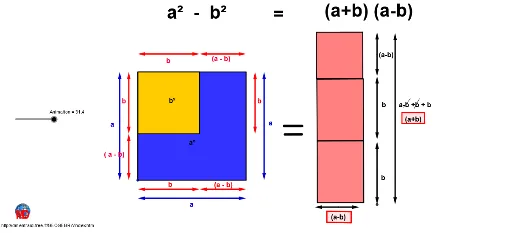
Proof without words: a²-b²
Loading the math board and drawing, please wait…
In collections
Algebraic puzzles for binomial formula
This example visually demonstrates the algebraic identity a²-b² through dynamic geometric constructions. It involves core concepts like algebraic manipulation, geometric symmetry, and vector operations. Key GeoGebra commands used include Circle, Line, Intersect, Polygon, Midpoint, Vector, Rotate, Segment, Tangent, and Point to create the visual proof. Suitable for high school mathematics education to illustrate the geometric foundation of algebraic identities.
GeoGebra Commands & Parameters
Circle(A, a) → cLine(A, xAxis) → dIntersect(c, d) → B, CCircle(C, a) → eLine(C, yAxis) → fIntersect(e, f) → D, ELine(D, d) → gIntersect(c, g) → F, GPolygon(F, D, C, A) → poly1, f_1, d_1, c_1, a_1Intersect(g, f_1) → HCircle(F, b) → hIntersect(h, g) → I, JLine(J, f) → iIntersect(h, a_1) → K,Line(K, g) → jIntersect(i, j) → LPolygon(F, J, L, K) → poly2, f_2, j_1, l, kCircle(F, a / 6) → pCircle(D, a / 6) → qCircle(C, a / 6) → rCircle(A, a / 6) → sIntersect(p, g) → M, NIntersect(r, d) → Q, RIntersect(q, g) → S, TIntersect(q, f) → U, VIntersect(r, f) → W, ZLine(T, yAxis) → mLine(U, j) → nLine(M, i) → t_2Line(Z, d) → a1Intersect(p, n) → A1, B1Intersect(s, a1) → C1, D1Intersect(j, t_2) → E1Intersect(j, m) → F1Intersect(i, n) → G1Midpoint(G1, A1) → H1Midpoint(G1, U) → I1Midpoint(T, R) → J1Midpoint(C1, Z) → K1Midpoint(F, M) → L1Midpoint(K, E1) → M1Vector(J1, T) → uIntersect(r, m, 1) → P1Vector(J1, R) → vVector(I1, U) → wVector(I1, G1) → zVector(H1, G1) → u1Vector(H1, A1) → v1Midpoint(L1, M1) → Q1Vector(Q1, L1) → w1Vector(Q1, M1) → z1Vector(K1, Z) → d1Vector(K1, C1) → e1Midpoint(J, K) → S1Intersect(j, d_1) → U1Intersect(i, d) → V1Midpoint(A, C1) → W1Intersect(i, a1) → Z1Midpoint(V1, Z1) → A2Midpoint(C, Z) → B2Midpoint(W1, A2) → C2Midpoint(A2, B2) → D2Midpoint(D, T) → E2Midpoint(U1, F1) → F2Midpoint(E2, F2) → G2Vector(G2, E2) → h1Vector(G2, F2) → i1Vector(C2, A2) → j1Vector(C2, W1) → k1Vector(D2, A2) → l1Vector(D2, B2) → m1Polygon(J, D, U1, L) → poly3, j_2, d_2, u1_1, l_1Rotate(J, ((-Animation)) / 10, I2) → J'Rotate(D, ((-Animation)) / 10, I2) → D'Rotate(U1, ((-Animation)) / 10, I2) → U1'Rotate(L, ((-Animation)) / 10, I2) → L'Polygon(J', D', U1', L') → poly3', j', d', u1', l'Line(U1', yAxis) → q1Rotate(L, ((-Animation)) / 10, O) → PLine(L, yAxis) → c1Rotate(L, ((-Animation)) / 10, O) → H2Rotate(K, ((-Animation)) / 10, N1) → O1Segment(O1, H2) → b1Circle(H2, b) → f1Intersect(f1, b1) → J2,Circle(J2, a - b) → g1Tangent(J2, f1) → n1, p1Line(H2, n1) → r1Intersect(g1, n1) → K2, L2Line(K2, b1) → s1Intersect(r1, s1) → M2Polygon(K2, J2, H2, M2) → poly4, k2, j2, h2, m2Rotate(U1, ((-Animation)) / 10, R1) → N2Polygon(L, U1, C, V1) → poly5, l_2, u1_2, c_2, v1_1Rotate(C, ((-Animation)) / 10, R1) → O2Segment(O2, N2) → t1Circle(N2, a - b) → c2Tangent(O2, c2) → a2, b2Line(N2, a2) → d2Circle(O2, a - b) → e2Intersect(e2, a2) → P2, Q2Line(Q2, t1) → f2Intersect(d2, f2) → R2Polygon(O2, N2, R2, Q2) → poly6, o2, n2, r2, q2Circle(A, a / 6) → g2Line(L1, M1) → i2Line(A, V1) → l2Intersect(i2, l2) → S2Midpoint(M1, S2) → U2Intersect(g2, l2) → V2, W2Vector(E1, M) → u2Vector(E1, V2) → v2Vector(U2, M1) → w2Vector(U2, S2) → z2Polygon(F, J, L, K) → poly7, f_3, j_3, l_3, k_1Polygon(F, D, C, A, K) → poly8, f_4, d_3, c_3, a_2, k_2Polygon(U1', H2, J', D') → poly9, u1'_1, h2_1, j'_1, d'_1Polygon(K2, J2, P, M2) → poly10, k2_1, j2_1, p_1, m2_1Polygon(O2, Q2, R2, N2) → poly11, o2_1, q2_1, r2_1, n2_1Line(Z2, yAxis) → s2Point(s2) → B3Point(s2) → C3Vector(Z2, B3) → p2Point(s2) → A3Vector(Z2, A3) → t2Line(D3, xAxis) → a3Point(a3) → E3Point(a3) → F3Vector(D3, F3) → u3Vector(D3, E3) → v3Line(B3, xAxis) → b3Circle(B3, a / 6) → c3Intersect(c3, b3) → G3, H3Line(G3, p2) → d3Point(d3) → I3Point(d3) → J3Point(d3) → K3Midpoint(I3, G3) → L3Midpoint(I3, J3) → M3Midpoint(J3, K3) → N3Vector(L3, G3) → w3Point(d3) → O3Vector(L3, O3) → z3Vector(M3, I3) → e3Vector(M3, J3) → f3Vector(N3, J3) → g3Vector(N3, K3) → h3Polygon(P3, Q3, R3, S3) → poly12, p3, q3, r3, s3Polygon(U3, V3, W3, Z3) → poly13, u3_1, v3_1, w3_1, z3_1Segment(A4, B4) → i3Segment(C4, D4) → j3Segment(E4, F4) → k3Segment(G4, H4) → l3
AI Drawing Prompt Reference
Draw a geometric figure demonstrating the difference of squares identity. Start with a large circle centered at the origin, intersecting the horizontal axis at two points. Use the right intersection as a center for another circle of the same radius, intersecting the vertical axis. Connect these points to form a large square. Inside this square, draw a smaller circle centered at the lower-left vertex, intersecting the bottom side. From the right intersection, draw a vertical line, and from the intersection of this line with the small circle, draw a horizontal line to meet another line, forming a smaller square. Finally, place small circles at the four vertices of the large square, and add auxiliary lines, midpoints, and arrows to indicate vectors, illustrating the area relationship.
The prompt above was compiled from the original drawing commands and is for reference only.