
Projections of a Cube by Kristen Beck
Loading the math board and drawing, please wait…
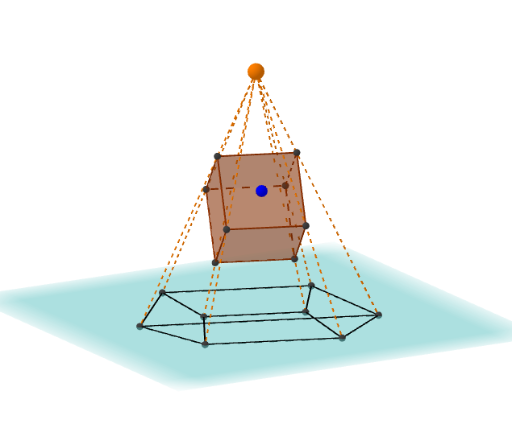
This example demonstrates the projections of a cube. It involves key concepts in solid geometry such as projection and planes. Using GeoGebra commands like Sphere, PointIn, Vector, etc., it dynamically shows the projections of a cube onto different planes. Suitable for high school geometry lessons.
GeoGebra Commands & Parameters
Sphere((0, 0, 0), r) → sPointIn(s) → PVector(P) → uOrthogonalPlane(P, u) → aAngle(Vector[Z], Vector[P]) → φAngle(Vector[X], Vector[(x(P), y(P), 0)]) → θAngle(Vector[X], Vector[(x(P), y(P), 0)]) → θ'If(y(P) ≥ 0, (((r * sin(φ + π / 2)) * cos(θ)), ((r * sin(φ + π / 2)) * sin(θ)), (r * cos(φ + π / 2))), (((r * sin(φ + π / 2)) * cos(θ')), ((r * sin(φ + π / 2)) * sin(θ')), (r * cos(φ + π / 2)))) → QVector(Q) → vOrthogonalPlane(Q, v) → bIntersectPath(a, b) → jLine(O, d) → fIntersect(f, s) → A, RVector(R) → wOrthogonalPlane(R, w) → cIntersectPath(a, c) → kIntersect(j, k) → BIntersectPath(b, c) → gCube(C, B, D) → e, E, face5, face6, edge1, edge2, edge3, edge4, edge5, edge6, edge7, edge8, G, edge9, edge10, edge11, edge12, H, I, J, face1, face2, face3, face4Segment(C', G') → hSegment(G', H') → iSegment(C', B') → lSegment(B', H') → mSegment(B', D') → nSegment(C', E') → pSegment(E', D') → qSegment(G', J') → tSegment(J', E') → f_1Segment(I', H') → g_1Segment(J', I') → h_1Intersect(F, Line[S, B]) → B''Intersect(F, Line[S, C]) → C''Intersect(F, Line[S, D]) → D''Intersect(F, Line[S, E]) → E''Intersect(F, Line[S, G]) → G''Intersect(F, Line[S, H]) → H''Intersect(F, Line[S, I]) → I''Intersect(F, Line[S, J]) → J''Segment(C'', G'') → i_1Segment(G'', H'') → j_1Segment(C'', B'') → k_1Segment(B'', H'') → l_1Segment(E'', D'') → m_1Segment(E'', J'') → n_1Segment(J'', I'') → p_1Segment(I'', D'') → q_1Segment(C'', E'') → r_1Segment(D'', B'') → s_1Segment(J'', G'') → t_1Segment(I'', H'') → a_1Segment(S, B'') → b_1Segment(S, C'') → c_1Segment(S, D'') → d_1Segment(S, E'') → e_1Segment(S, H'') → f_2Segment(S, G'') → g_2Segment(S, J'') → h_2Segment(S, E'') → i_2Segment(S, I'') → j_2
AI Drawing Prompt Reference
Draw a cube and show its projections onto different planes. Start by creating a sphere and selecting a point on it. Draw a vector through this point and create an orthogonal plane based on the vector. Calculate the angles with the coordinate axes, determine the projection points' coordinates, and draw the projection paths. Finally, combine the cube with the projection paths to display the projections onto various planes.
The prompt above was compiled from the original drawing commands and is for reference only.