
Projection of a Segment
Loading the math board and drawing, please wait…
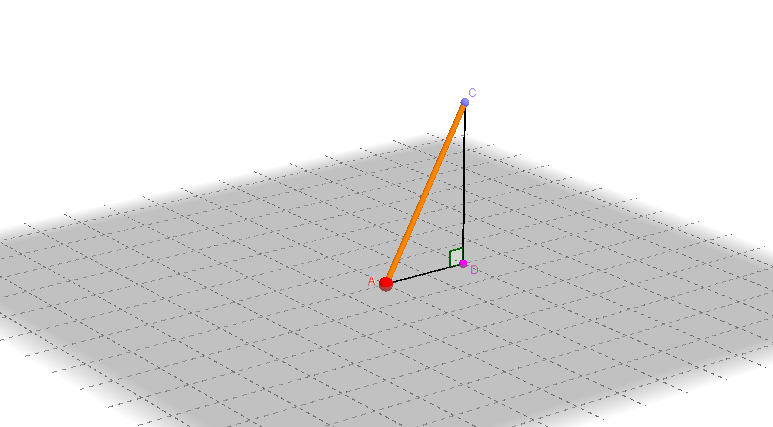
This example demonstrates the projection of a line segment onto a plane. It involves core mathematical concepts such as line segments, planes, projections, orthogonal lines, and angles. The construction uses GeoGebra commands like Intersect, Point, Sphere, PointIn, Segment, OrthogonalLine, and Angle. It is suitable for high school mathematics teaching, particularly in solid geometry to understand line-plane projection relationships and calculate projection lengths.
GeoGebra Commands & Parameters
Intersect(yAxis, xAxis) → APoint(zAxis) → BSphere(A, B) → aPointIn(a) → CSegment(C, A) → bOrthogonalLine(C, xOyPlane) → cIntersect(c, xOyPlane) → DSegment(C, D) → dSegment(A, D) → eAngle(C, D, A) → α
AI Drawing Prompt Reference
In 3D space, start by marking the intersection of the coordinate axes as a base point. Then choose a point on the vertical axis and draw a sphere centered at that point passing through the base point. Pick an arbitrary point on the sphere's surface and connect it to the base point with a segment. From the surface point, drop a line perpendicular to the horizontal plane, and mark where it meets the plane as the projection point. Connect the surface point to the projection point, and also connect the base point to the projection point. Finally, measure the angle at the projection point between the lines to the surface point and the base point, illustrating the projection of the segment onto the plane.
The prompt above was compiled from the original drawing commands and is for reference only.