
Probability with Random Point in Equilateral Triangle
Loading the math board and drawing, please wait…
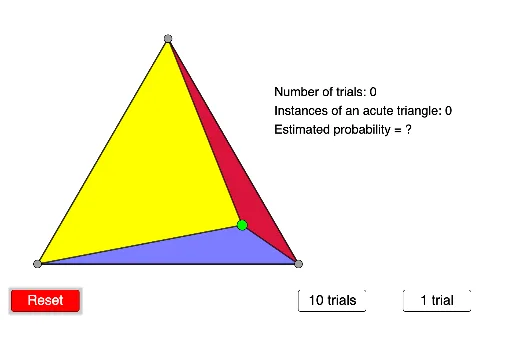
This example demonstrates the probability calculation when a point is randomly placed inside an equilateral triangle, focusing on the sum of areas of triangles formed with at least one side of the triangle. Key math concepts include probability & statistics, geometric construction, area calculation, and random events. GeoGebra commands like Point, Polygon, RandomPointIn, Segment, Angle, Length, Sum are used to construct the triangle, random point, and related segments, angles, and length sums. Suitable for high school mathematics teaching on geometric probability and area relationships.
GeoGebra Commands & Parameters
Point(xAxis) → APoint(xAxis) → BPolygon(A, B, 3) → poly1, f, g, h, CRandomPointIn(poly1) → DPolygon(C, D, A) → t1, a, c, dPolygon(C, B, D) → t2, d_1, c_1, bPolygon(A, D, B) → t3, b_1, a_1, d_2Segment(C, D) → iSegment(D, A) → jSegment(D, B) → kAngle(C, D, A) → αAngle(A, D, B) → βAngle(B, D, C) → γLength(data) → lSum(data) → m
AI Drawing Prompt Reference
Place two points on the x-axis to form the base of an equilateral triangle. Construct the triangle and randomly select a point inside it. Connect this interior point to all three vertices, dividing the triangle into three smaller triangles. Calculate the area of each small triangle and their total sum. Also measure the three segment lengths from the interior point to the vertices, and the three angles formed at that point. Display the total area and the sum of segment lengths to explore geometric probability relationships.
The prompt above was compiled from the original drawing commands and is for reference only.