
Prism Volume Calculation
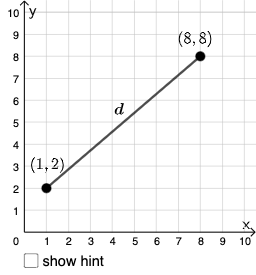
Loading the math board and drawing, please wait…
In collections
Open Middle: Distance in the Coordinate Plane
This example demonstrates how to calculate the volume of a prism using geometric construction. Key mathematical concepts include the definition of a prism, volume calculation formulas, and dynamic demonstration using GeoGebra commands. The construction summary mentions the use of PointIn, Segment, SurdText, Textfield, and other commands.
GeoGebra Commands & Parameters
PointIn(e) → APointIn(e) → BSegment(A, B) → fSurdText(f) → text1Textfield(j) → InputBox1Textfield(k) → InputBox2Point(Circle[A, sqrt((10 * j) + k)]) → CSegment(A, C) → lIf(m < i, "Too short!", m > i, "Too long!", "This value is correct!") → text7Mode(l1) → l2If(Length[l2] ≟ 0, "No digits repeat!", "Repeated digits exist.") → text8Intersect(eq1, p) → DPolygon(A, D, B) → t1, b_1, a_1, d_1Segment(A, D) → qSegment(D, B) → rAngle(B, D, A) → α
AI Drawing Prompt Reference
Draw a right prism by first selecting two points A and B on a plane and connecting them to form one side f of the base. Input the side length j and height k, then construct a circle at point A and find its intersection with line f to get point C, and connect AC to form another side l of the base. Calculate the prism's volume based on the side length and height, check if the input length is appropriate, and verify if the input numbers are repeated. Finally, connect points A, D, and B to form the prism's side faces and calculate the angle α at the base.
The prompt above was compiled from the original drawing commands and is for reference only.