
Printable Puzzles
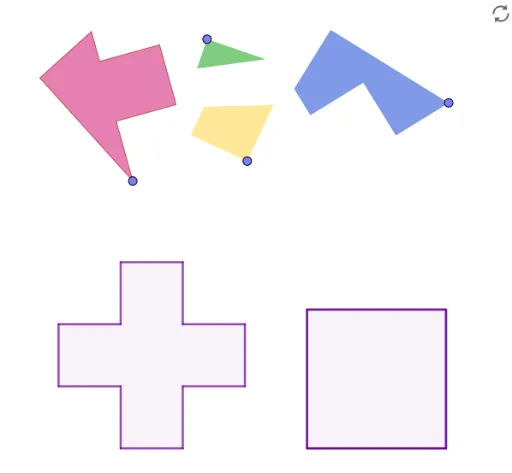
Loading the math board and drawing, please wait…
In collections
Developing games and puzzles with 3D printing for STEAM
Developing fun games and puzzles with 3D printing for STEAM
This example demonstrates geometric constructions and transformations through interactive graphics; involves core math concepts like bar charts, random variables, mode, triangles, differential equations; constructed using commands like Point, Segment, Circle, OrthogonalLine, Intersect, Polygon, Midpoint; suitable for high school and above students and teachers for teaching demonstrations and geometric construction practice.
GeoGebra Commands & Parameters
Point(Circle[A, r]) → BSegment(A, B) → fCircle(A, r) → cCircle(A, (2 * r)) → dCircle(A, (3 * r)) → eOrthogonalLine(A, f) → gIntersect(c, g, 2) → CIntersect(d, g, 2) → DIntersect(e, g, 2) → EOrthogonalLine(C, g) → hOrthogonalLine(D, g) → iOrthogonalLine(E, g) → jCircle(C, r) → kCircle(C, (2 * r)) → pIntersect(k, h, 2) → FIntersect(k, h, 1) → IIntersect(p, h, 1) → JOrthogonalLine(F, h) → lOrthogonalLine(I, h) → mOrthogonalLine(J, h) → nIntersect(n, i) → GIntersect(j, m) → HIntersect(i, m) → KIntersect(i, l) → LPolygon(A, C, I, B, F, L, D, E, H, K, G, J) → poly1, a, j_1, i_1, b, c_1, f_1, l_1, d_1, e_1, h_1, k_1, g_1Segment(C, G) → qOrthogonalLine(C, q) → sIntersect(s, l_1) → MIntersect(s, f) → NPolygon(M, C, G, K, H, E, D) → poly2, m_1, c_2, g_2, k_2, h_2, e_2, d_2Polygon(N, C, G, J, I, B) → poly3, n_1, c_3, g_3, j_2, i_2, b_1Polygon(C, A, N) → poly4, n_2, c_4, a_1Polygon(L, F, C, M) → poly5, l_2, f_2, c_5, m_2Point(Circle[P, q]) → QSegment(P, Q) → tOrthogonalLine(P, t) → p_1Circle(P, m_1) → q_1Intersect(q_1, p_1, 2) → RSegment(R, P) → r_1Segment(R, Q) → s_1OrthogonalLine(P, s_1) → t_1Intersect(t_1, s_1) → SCircle(S, r) → p_2Intersect(p_2, s_1, 1) → TPolygon(S, T, 4) → poly6, q_2, r_2, s_2, t_2, U, VPolygon(P, R, S, V, U, T, Q) → poly7, p_3, r_3, s_3, v, u, t_3, q_3Circle(W, c_3) → d_3Point(d_3) → ZSegment(W, Z) → a_2OrthogonalLine(W, a_2) → b_2Circle(W, n_1) → e_3Intersect(e_3, b_2, 1) → A_1Segment(W, A_1) → f_3Midpoint(a_2) → B_1Circle(B_1, W) → h_3Circle(W, (2 * r)) → k_3Intersect(h_3, k_3, 1) → C_1Midpoint(W, C_1) → D_1Segment(W, C_1) → i_3OrthogonalLine(D_1, i_3) → j_3Circle(D_1, r) → d_4Intersect(d_4, j_3, 1) → E_1Polygon(W, Z, C_1, D_1, E_1, A_1) → poly8, w, z_1, c_6, d_5, e_4, a_3Point(Circle[F_1, r]) → G_1Segment(F_1, G_1) → l_3OrthogonalLine(G_1, l_3) → m_3Circle(G_1, r) → f_4Intersect(f_4, m_3, 2) → H_1Segment(L, M) → n_3OrthogonalLine(F_1, l_3) → b_3Circle(F_1, n_3) → g_4Intersect(g_4, b_3, 2) → I_1Segment(I_1, H_1) → h_4Polygon(I_1, F_1, G_1, H_1) → poly9, i_4, f_5, g_5, h_5Point(Circle[J_1, r]) → K_1Segment(J_1, K_1) → j_4OrthogonalLine(K_1, j_4) → k_4Segment(A, N) → l_4Circle(K_1, Segment[A, N]) → p_4Intersect(p_4, k_4, 2) → L_1Polygon(J_1, L_1, K_1) → poly10, k_5, j_5, l_5Point(Circle[M_1, c_3]) → N_1Segment(M_1, N_1) → m_4Polygon(M_1, N_1, 4) → poly11, n_4, q_4, r_4, s_4, O_1, P_1
AI Drawing Prompt Reference
Draw a complex geometric figure consisting of multiple circles and triangles, with a central circle and three concentric circles, connected by orthogonal lines and intersection points to form several triangles and quadrilaterals, demonstrating geometric constructions and transformations, including randomly generated points and line segments, suitable for teaching demonstrations.
The prompt above was compiled from the original drawing commands and is for reference only.