
Complex Symmetry Maze: Polygon Sequence and Symmetry Transformations
Loading the math board and drawing, please wait…
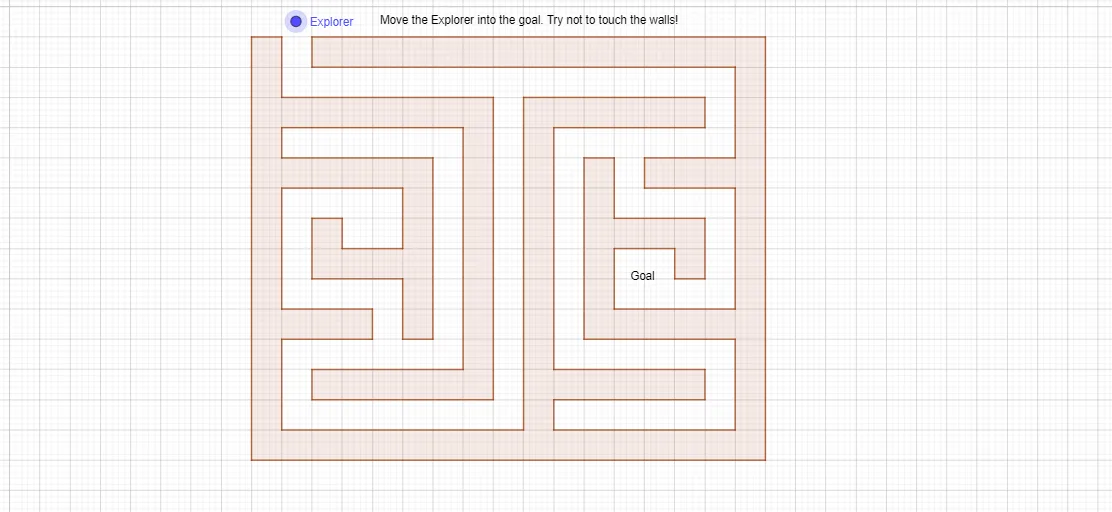
① This example constructs a complex polygon by connecting a series of labeled points (e.g., A_1, B_1, C_1, ..., I_3) in a specific order, creating a maze-like symmetric figure that visually demonstrates symmetry and iterative structures in the complex plane. ② Core mathematical concepts include complex numbers, symmetry transformations (rotation, reflection), set-theoretic point constructions, and potential connections to piecewise functions and upper/lower Riemann sums, highlighting interdisciplinary mathematics. ③ Construction highlights: The primary GeoGebra command is Polygon, which sequentially connects numerous named points (I_3, H_3, Z_2, W_2, V_2, U_2, T_2, S_2, R_2, Q_2, G_2, P_2, O_2, N_2, M_2, L_2, J_2, I_2, H_2, P_1, D_1, C_1, B_1, A_1, Z, Q, P, O, N, M, L, K, J, H, G, F, E, E_1, F_1, G_1), likely generated via complex iterations or symmetry transformations, to form a closed polygon. ④ Suitable for high school to university-level mathematics education, this example is ideal for exploring complex geometry, symmetry, sequence construction, and advanced GeoGebra techniques, as well as for mathematical art or competition extensions.
GeoGebra Commands & Parameters
Polygon(A, B, C, D) → poly1, f, g, h, iPolygon(E_2, F_2, O_1, I_1, H_1, G_1, F_1, E_1, D_1, I_3, K, J, O_2, H, G, F, E, C_1, B_1, A_1, Z, Q, P, P_2, O, N, M, Z_2, W_2, V_2, H_3, A_3, B_3, C_3, W_1, D_3, E_3, F_3, G_3, N_1, L, G_2, Q_2, R_2, S_2, V_1, T_2, U_2, H_2, I_2, J_2, K_2, L_2, M_2, N_2, D_2, Z_1, B_2, A_2, C_2) → poly3, j, t, a, b, c, d, e, f_1, g_1, h_1, i_1, k, j_1, k_1, l_1, m_1, n_1, p_1, q_1, r_1, s_1, t_1, l, a_1, b_1, c_1, d_1, e_1, f_2, g_2, h_2, i_2, j_2, m, k_2, l_2, m_2, n_2, p_2, q_2, r_2, s_2, t_2, a_2, n, b_2, c_2, d_2, e_2, f_3, g_3, h_3, i_3, j_3, k_3, p, l_3, q, r, s
AI Drawing Prompt Reference
Draw a complex polygon maze by connecting a series of labeled points (e.g., A_1, B_1, C_1, ..., I_3) in a specific order. Start with a basic polygon and then use rotation, reflection, and other symmetry transformations to build a complex symmetric figure, forming a maze-like pattern.
The prompt above was compiled from the original drawing commands and is for reference only.