
Pringles Modeling in GeoGebra 3D: Quick Demo
Loading the math board and drawing, please wait…
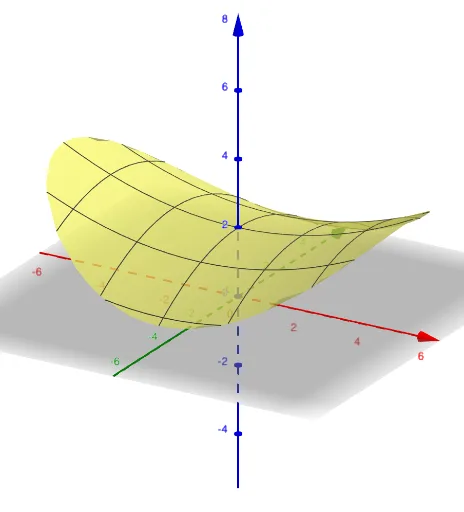
This example demonstrates how to model the geometric shape of Pringles using GeoGebra 3D, focusing on the construction of rotational surfaces and 3D solids. Key mathematical concepts include rotational surfaces, volume of solids of revolution, analytical geometry, and solid geometry. The construction involves 3D rotation and parametric modeling, utilizing objects like 'a' as described. Suitable for high school students and teachers for learning and teaching demonstrations, helping to understand the practical applications of rotational bodies and 3D geometry.
GeoGebra Commands & Parameters
a(x, y) = If[x^(2) / 15 + y^(2) / 9 ≤ 2, x^(2) / 22 - y^(2) / 13 + 2]
AI Drawing Prompt Reference
Create a Pringles-like chip shape by first drawing an elliptical cross-section, then rotating it around the y-axis to form a 3D chip shape. Use the parametric equation x^2/22 - y^2/13 + 2 to define the cross-section, which is within the range x^2/15 + y^2/9 ≤ 2.
The prompt above was compiled from the original drawing commands and is for reference only.