
Practice: Equation of Circles - Interactive Input and Dynamic Verification
Loading the math board and drawing, please wait…
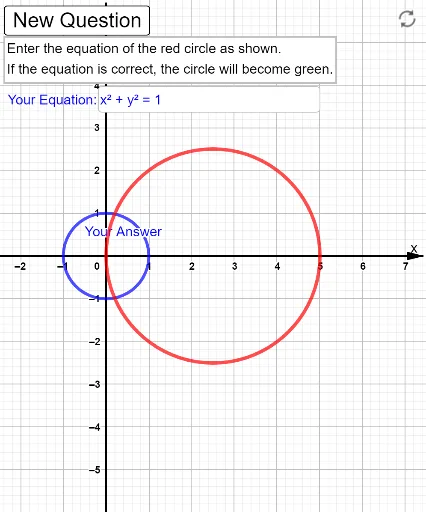
① This example demonstrates how to write the standard equation of a circle given its center and radius, with interactive input fields and real-time verification. ② The core mathematical concept is the standard equation of a circle in coordinate geometry: (x-h)²+(y-k)²=r², emphasizing the geometric meaning of parameters h, k, and r. ③ Construction details: The GeoGebra commands used include Sequence to generate points on the circle, If to check whether the user's input matches the standard equation, Textfield and InputBox for user input, button1 to trigger verification, variables vars to store parameters, eq1 and eq2 for the standard and user equations, and text1 to display feedback. ④ Suitable for high school students learning coordinate geometry, useful for classroom practice or self-study to reinforce the connection between algebraic equations and geometric circles.
GeoGebra Commands & Parameters
Sequence(Random[-10, 10] / 2, n, 1, 3) → varsIf(vars(3) ≟ 0, 1, abs(vars(3))) → rTextfield(eq1) → InputBox1
AI Drawing Prompt Reference
Draw a coordinate plane with a circle whose center and radius are variable. Place several points evenly distributed on the circle, determined by randomly generated center coordinates and radius. Next to the graph, include an input field for the circle's equation and a button that, when clicked, checks whether the entered equation matches the standard form. If it matches, show a correct message; otherwise, show an error message. The whole figure is for practicing the standard equation of a circle, emphasizing the geometric meaning of the center and radius.
The prompt above was compiled from the original drawing commands and is for reference only.