
Geometric Construction of the Angle of Inclination
Loading the math board and drawing, please wait…
In collections
Coordinate Geometry
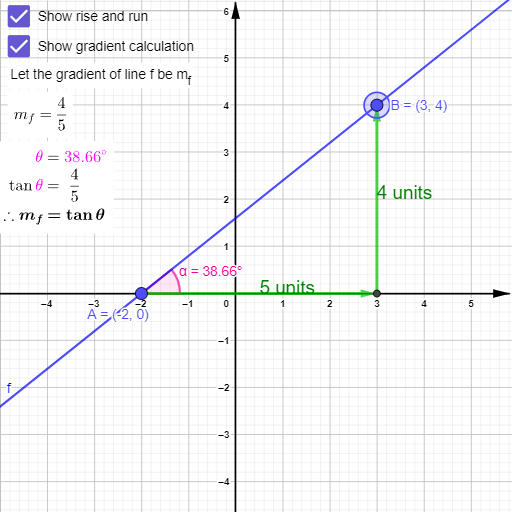
This example visualizes the geometric meaning of the angle of inclination (the direction angle of a line) and highlights how the measured angle changes through clear on-screen labeling. Key concepts include the angle of inclination tied to a line’s direction, angle construction and annotation, and continuity of geometric measurements as defining elements vary. Construction highlights from the provided GeoGebra command set: Point is used to create the defining points (e.g., A, B and related objects), If drives conditional logic to choose a configuration or update the construction, Angle computes the inclination angle (e.g., the angle α), and Text adds descriptive labels (text objects such as text1/text2/text3/text5/text6) to present the result and guide interpretation. Suitable for secondary to early undergraduate geometry/coordinate-geometry instruction, especially for teaching slope-to-angle relationships, direction of lines, and practical geometric construction skills in GeoGebra.
GeoGebra Commands & Parameters
Point(xAxis) → AIf(y(B) ≥ 0, Line[A, B], Line[B, A]) → fIf(x(E) ≟ x(A), Vector[B, E], Vector[A, E]) → uIf(x(E) ≟ x(A), Vector[E, A], Vector[E, B]) → vIf(x(E) ≟ x(A), Segment[B, E], Segment[A, E]) → hIf(x(E) ≟ x(A), Segment[E, A], Segment[E, B]) → iText(b + " units", Midpoint[h]) → text1Text(c + " units", Midpoint[i]) → text2Angle(xAxis, f) → α
AI Drawing Prompt Reference
Draw a line AB with point A on the x-axis and point B having a non-negative y-coordinate. Construct line AB and measure the angle α between the x-axis and line AB. Take a point E on line AB and construct vectors u and v from E to A and B respectively. Measure the lengths of vectors u and v and label their midpoints with the lengths.
The prompt above was compiled from the original drawing commands and is for reference only.