
Position Relationship of Two Planes
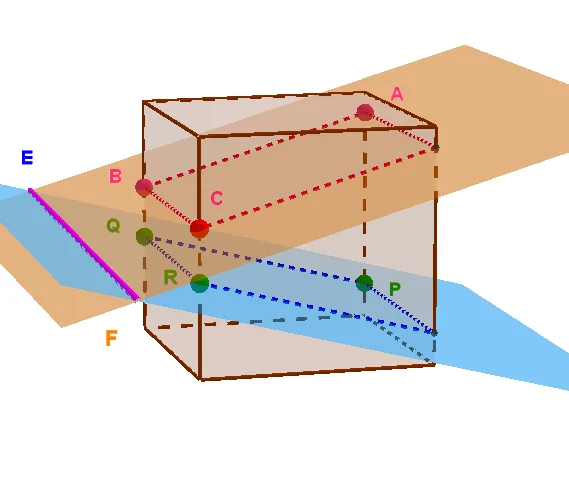
Loading the math board and drawing, please wait…
This example demonstrates the position relationship between two planes. Key mathematical concepts include the definition of a plane, rotation or rotation, and basic concepts in solid geometry. Using GeoGebra commands such as Cube, Polygon, Point, Plane, Intersect, etc., a cube can be constructed and the positional relationship between its faces can be observed. Suitable for high school or university solid geometry courses.
GeoGebra Commands & Parameters
Cube(A, B, C) → a, D, FlächeCDHG, FlächeEFGH, KanteAD, KanteAB, KanteBC, KanteCD, KanteAE, KanteDH, KanteEH, KanteEF, E, KanteBF, KanteFG, KanteCG, KanteGH, F, G, H, FlächeABCD, FlächeADHE, FlächeABFE, FlächeBCGFPolygon(B, F, G, C) → v2, b, f_1, g, cPoint(KanteBF) → JPolygon(A, E, H, D) → v1, a_1, e, h, dPoint(KanteAE) → IPoint(KanteAE) → KPoint(KanteBF) → LPoint(KanteCG) → QPlane(round((K * 100)) / 100, round((L * 100)) / 100, round((Q * 100)) / 100) → iIntersect(zAxis, xAxis) → MPoint(xAxis) → NVector(M, N) → uPoint(yAxis) → OVector(M, O) → vPoint(zAxis) → PVector(M, P) → wPointIn(i) → TOrthogonalVector(i) → jPoint(KanteCG) → SPlane(round((I * 100)) / 100, round((J * 100)) / 100, round((S * 100)) / 100) → fPointIn(f) → UIntersectPath(i, f) → lIntersect(i, KanteAD) → V1Intersect(i, KanteCD) → V2Segment(K, L) → mSegment(L, Q) → nSegment(Q, V2) → pSegment(V2, V1) → qSegment(V1, K) → rIntersect(i, KanteDH) → V3Segment(K, V3) → sSegment(V3, Q) → tIntersect(f, KanteDH) → V4Segment(J, S) → g_1Segment(S, V4) → h_1Segment(V4, I) → i_1Segment(I, J) → j_1Intersect(f, KanteEH) → V5Intersect(f, Segment[G, H]) → V6Segment(I, V5) → k_1Segment(V5, V6) → l_1Segment(S, V6) → m_1Intersect(f, KanteCD) → V7Intersect(f, KanteAD) → V8Segment(S, V7) → n_1Segment(V7, V8) → p_1Segment(V8, I) → q_1Intersect(i, KanteGH) → V9Intersect(i, KanteEH) → VASegment(Q, V9) → r_1Segment(V9, VA) → s_1Segment(VA, K) → t_1