
Line and Plane Position Relationship (GeoGebra)
Loading the math board and drawing, please wait…
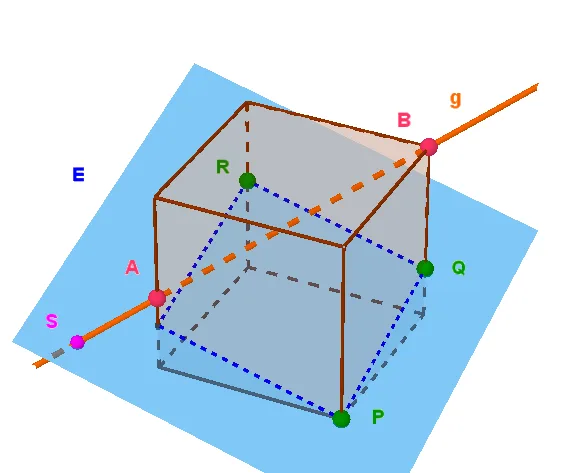
This GeoGebra example demonstrates the positional relationship between a line and a plane in three-dimensional space, including cases of intersection, parallelism, and perpendicularity. Core mathematical concepts involve three-dimensional analytic geometry, vector operations, intersection point calculation, and distance formulas. Construction utilizes GeoGebra commands such as Cube, Plane, Line, Intersect, Vector, OrthogonalVector, Segment, and Distance to build a cube model with labeled faces and edges. Suitable for high school three-dimensional geometry lessons or introductory university space geometry, helping learners visually understand and compute the relative position of a line and a plane.
GeoGebra Commands & Parameters
Cube(A, B, C) → a, D, FlächeCDHG, FlächeEFGH, KanteAD, KanteAB, KanteBC, KanteCD, KanteAE, KanteDH, KanteEH, KanteEF, E, KanteBF, KanteFG, KanteCG, KanteGH, F, G, H, FlächeABCD, FlächeADHE, FlächeABFE, FlächeBCGFPolygon(B, F, G, C) → v2, b, f_1, g, cPointIn(v2) → JPolygon(A, E, H, D) → v1, a_1, e, h, dPointIn(v1) → ILine(round((I * 100)) / 100, round((J * 100)) / 100) → fPoint(KanteAE) → KPoint(KanteBF) → LPoint(KanteCG) → QPlane(round((K * 100)) / 100, round((L * 100)) / 100, round((Q * 100)) / 100) → iIntersect(f, i) → SIntersect(zAxis, xAxis) → MPoint(xAxis) → NVector(M, N) → uPoint(yAxis) → OVector(M, O) → vPoint(zAxis) → PVector(M, P) → wPointIn(i) → TOrthogonalVector(i) → jIntersect(i, Segment[A, D]) → U1Intersect(i, Segment[C, D]) → U2Intersect(i, Segment[H, D]) → U3Segment(K, L) → mSegment(L, Q) → nSegment(Q, U2) → pSegment(U2, U1) → qSegment(U1, K) → rSegment(Q, U3) → sSegment(U3, K) → tDistance(S, S) → SSIntersect(i, KanteGH) → U4Intersect(i, KanteEH) → U5Segment(Q, U4) → g_1Segment(U4, U5) → h_1Segment(U5, K) → i_1Point(f) → U
AI Drawing Prompt Reference
Draw a cube with all faces and edges. Then take two points on one edge and draw a line through them. Next, construct a plane using three edges of the cube as base points. This line intersects the plane at one point. Finally, calculate the angle between the line and the plane, and mark all key points and segments.
The prompt above was compiled from the original drawing commands and is for reference only.