
Polygons in Equilateral Triangle 2: Rhombus and Circle Construction
Loading the math board and drawing, please wait…
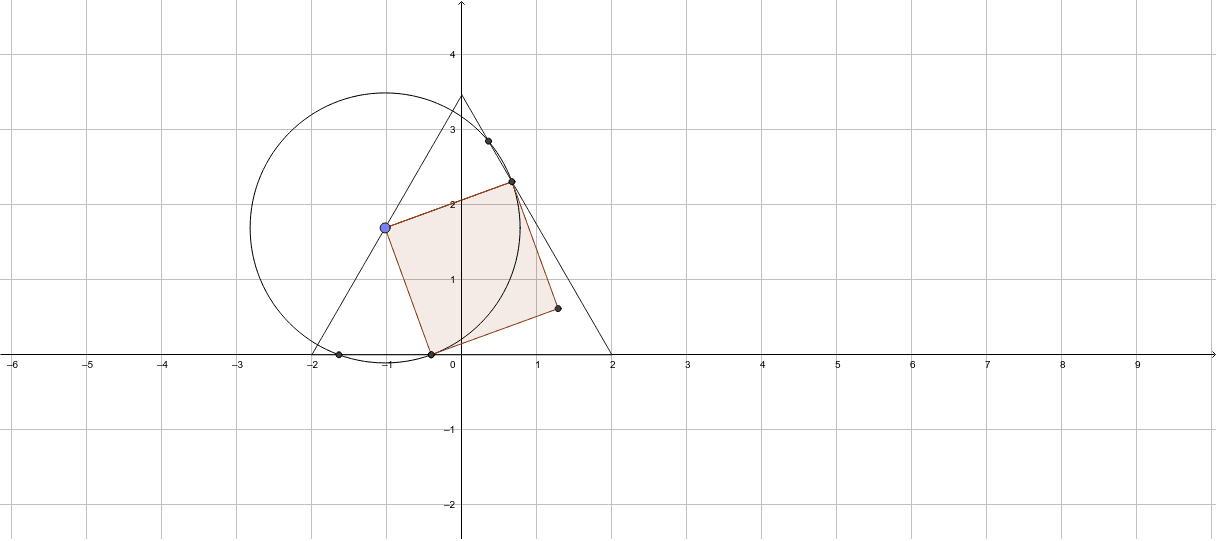
This GeoGebra example demonstrates the construction of multiple polygons, including a rhombus, inside an equilateral triangle, intersecting with circles, as part of a series. The core mathematical concepts involve symmetry of equilateral triangles, inscribed polygons, properties of rhombi, and intersections between circles and lines. The construction uses commands such as Point to create vertices A and B, Circle for circles c and d, Intersect to find points C and D, Polygon to form poly1 and poly2, Segment for connecting edges, and OrthogonalLine for perpendiculars. Numerous auxiliary points (E, F, I, G, H, J, K, L) and segments (a, b, e, f, g, h, i, l, k) are employed to achieve precise geometric relationships. Suitable for middle or high school geometry classes, or for enthusiasts exploring patterns of nested shapes within equilateral triangles, and for dynamic demonstrations of combined polygon-circle configurations.
GeoGebra Commands & Parameters
Point(xAxis) → APoint(xAxis) → BCircle(B, A) → cCircle(A, B) → dIntersect(c, d) → C, D, ,Polygon(C, B, A) → poly1, a, c_1, bPoint(a) → ECircle(E, 1.8) → eIntersect(e, b) → F, IIntersect(c_1, xAxis) → GIntersect(e, c_1, 1) → HIntersect(e, c_1, 2) → JSegment(E, F) → fOrthogonalLine(E, f) → gIntersect(e, g, 1) → KOrthogonalLine(K, g) → hOrthogonalLine(F, f) → iIntersect(h, i) → LPolygon(E, F, L, K) → poly2, e_1, f_1, l, k