
Perimeter of Rectilinear Shape by Mark Horley
Loading the math board and drawing, please wait…
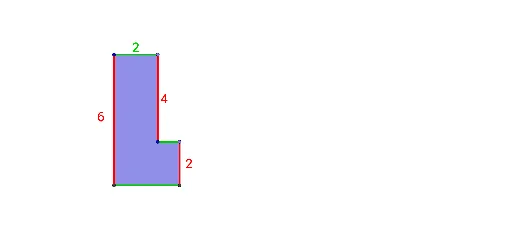
This example demonstrates how to calculate the perimeter of any rectilinear polygon. Key math concepts include perimeter calculation, polygon construction, and coordinate geometry. GeoGebra commands used are Line, Point, Intersect, and Polygon. Suitable for middle school students and above learning polygon perimeter and geometric construction techniques.
GeoGebra Commands & Parameters
Line(A, xAxis) → fLine(A, yAxis) → gPoint(g) → BLine(B, xAxis) → hPoint(f) → CLine(C, yAxis) → iIntersect(xAxis, yAxis) → DIntersect(h, yAxis) → EIntersect(i, xAxis) → FPolygon(D, E, B, A, C, F) → poly1, d, e, b, a, c, f_1Intersect(d, f_1) → HIntersect(c, f_1) → I
AI Drawing Prompt Reference
Draw a rectilinear polygon with four straight sides, marking all four vertices and the center point. Start by identifying the intersection points of the horizontal and vertical axes, then connect these points to form a rectangle. Next, connect the midpoints of the opposite sides to create an internal diagonal. Finally, add an extra line segment by connecting one vertex of the rectangle to an intersection point of the diagonal outside the rectangle.
The prompt above was compiled from the original drawing commands and is for reference only.