
Polygon Area Measurement
Loading the math board and drawing, please wait…
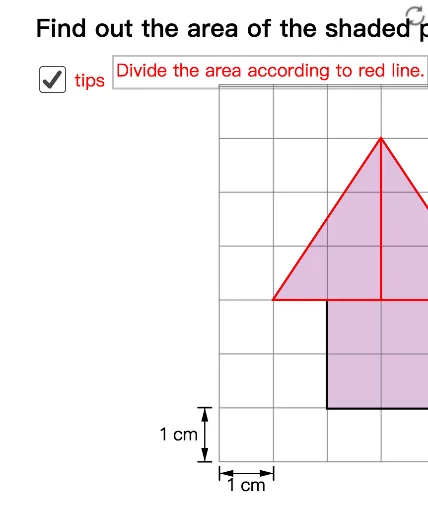
This example demonstrates how to dynamically construct and measure the area of a polygon. Key math concepts include polygons, incircles, vector operations, and coordinate geometry. GeoGebra commands/objects used in construction: Segment, Vector, Point, Min, Max, Translate, Polygon. Suitable for high school mathematics teaching to understand polygon area calculation methods and dynamic geometric properties.
GeoGebra Commands & Parameters
Segment(X0, X0 + (0, 0.25)) → gSegment(X0, X0 + (0, mark)) → hSegment(X0 + (1, 0), X0 + (1, mark)) → iVector(X0 + (0, mark / 2), X0 + (1, mark / 2)) → uVector(X0 + (1, mark / 2), X0 + (0, mark / 2)) → vSegment(Y0 - (mark, 0), Y0) → jSegment(Y0 - (mark, 1), Y0 - (0, 1)) → kVector(Y0 - (mark / 2, 1), Y0 - (mark / 2, 0)) → wVector(Y0 - (mark / 2, 0), Y0 - (mark / 2, 1)) → zPoint(yAxis) → BMin(t1, 1) → s1Max(t1 - 1, 0) → s2Translate(Translate[A, Vector[(s1 * Vector[A, C])]], Vector[(s2 * Vector[B, C])]) → A'Translate(Translate[B, Vector[(s1 * Vector[C, A])]], Vector[(s2 * Vector[B, C])]) → B'Translate(Translate[C, Vector[(s1 * Vector[C, A])]], Vector[(s2 * Vector[B, C])]) → C'Polygon(A', B', C') → poly1, c', a', b'Min(t2, 1) → w1Max(t2 - 1, 0) → w2Translate(Translate[A, Vector[(w1 * Vector[A, C])]], Vector[(w2 * Vector[D, C])]) → A''Translate(Translate[D, Vector[(w1 * Vector[C, A])]], Vector[(w2 * Vector[D, C])]) → D''Translate(Translate[C, Vector[(w1 * Vector[C, A])]], Vector[(w2 * Vector[D, C])]) → C''Polygon(A'', D'', C'') → poly2, c'', a'', d''Polygon(A', B', C') → poly1', c'_1, a'_1, b'_1Polygon(A'', D'', C'') → poly2', c''_1, a''_1, d''_1Polygon((1, 0), (3, 0), (3, 2), (1, 2)) → poly3, a, b, c, dPolygon(A, B, (1, 2), (1, 0), (3, 0), (3, 2), D) → poly4, a_1, b_1, e, f, l, m, d_1Polygon(A, B, C) → poly5, c_1, a_2, b_2Polygon(A, C, D) → poly6, d_2, a_3, c_2Segment((-1, 5.944976963954309), (5, 5.944976963954309)) → n