
Polygon and Sequence Construction in Rectangular Coordinates
Loading the math board and drawing, please wait…
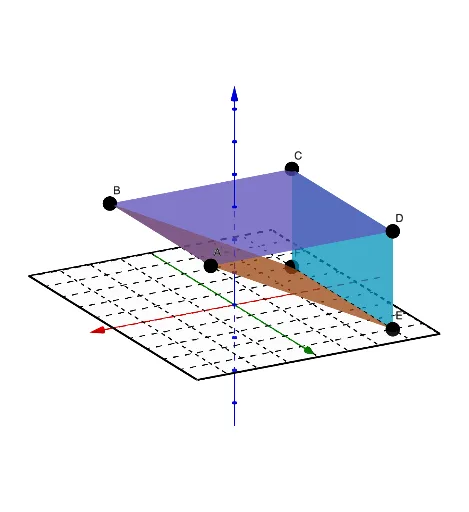
This example demonstrates how to construct polygon figures in a rectangular coordinate system using point coordinates, and how to generate sequences of points or line segments with the Sequence command to illustrate the correspondence between coordinates and geometry. Core mathematical concepts include coordinate geometry, rectangular coordinates, polygon vertices, sequence generation, and relationships involving area or loci. Construction highlights: the GeoGebra commands Polygon, Sequence, and Surface are used to create polygons, generate repeated objects, and define enclosed regions; relevant objects include points A, B, C, D, E, F, lines l1 and l2, and parameters or segments a, b, c, d. Suitable for middle and high school analytic geometry instruction, classroom demonstrations, and student-led exploration of coordinate figure properties.
GeoGebra Commands & Parameters
Polygon(A1, D1, C1, B1) → q1, a, b, d, cSequence(Segment[(4, n), (-4, n)], n, -5, 5) → l1Sequence(Segment[(n, 5), (n, -5)], n, -4, 4) → l2Surface(-3, s, t, s, -2, 4, t, 0, 3) → eSurface(s, t, 3, s, -3, 3, t, -2, 4) → fSurface(s, t, 3 / 2 + s / 2, s, -3, 3, t, -2, 4) → g
AI Drawing Prompt Reference
Draw a rectangle ABCD, then draw a series of parallel line segments to the y-axis above and below the x-axis to form two line segment sequences l1 and l2. Use the Surface command to draw three surfaces e, f, and g within specific ranges to illustrate the relationships between points, line segments, and areas in coordinate geometry.
The prompt above was compiled from the original drawing commands and is for reference only.