
Points in Triangle: Centroid Construction
Loading the math board and drawing, please wait…
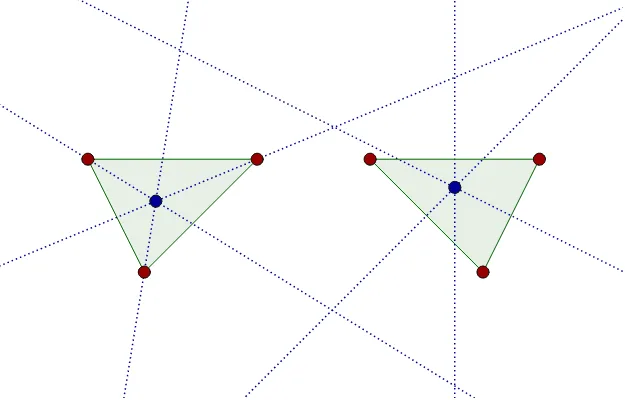
This example demonstrates the construction of specific points (such as the centroid) inside a triangle using geometric tools like angle bisectors and perpendicular bisectors. The core mathematical concepts include the centroid (barycenter) of a triangle, angle bisectors, perpendicular bisectors, and the relationship between polygon areas and points. Construction details: Using GeoGebra commands Polygon to create triangle ABC, AngularBisector to construct angle bisectors, LineBisector for perpendicular bisectors, and Intersect to find intersection points D, E, F, then connecting these to form inner polygon poly1, with auxiliary lines f_1, d_1, e_1 to further determine points G and H. Suitable for middle and high school geometry lessons, helping students understand the geometric construction and properties of special points in triangles, and explore how the centroid divides the triangle into equal-area regions.
GeoGebra Commands & Parameters
Polygon(A, B, C) → Polygon1, c, a, bAngularBisector(B, A, C) → dAngularBisector(A, C, B) → eAngularBisector(C, B, A) → fPolygon(D, E, F) → poly1, f_1, d_1, e_1LineBisector(D, E) → gLineBisector(E, F) → hLineBisector(F, D) → iIntersect(g, h) → GIntersect(e, f) → H
AI Drawing Prompt Reference
Draw a triangle and construct its three angle bisectors intersecting inside the triangle. Connect the intersection points of these bisectors to form a new inner polygon. Then, draw auxiliary lines from these points and find their intersections to determine two special points, illustrating the centroid and its property of dividing the triangle into equal-area regions.
The prompt above was compiled from the original drawing commands and is for reference only.