
Points in 3D Coordinate System Activity
Loading the math board and drawing, please wait…
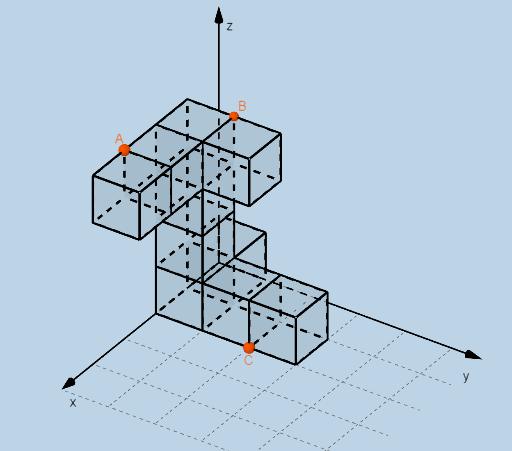
This example demonstrates plotting and modifying points in 3D space, involving core math concepts like 3D coordinate representation, vector operations, distance calculations between points, and geometric transformations. Key GeoGebra commands and objects used include Dilate, Distance, Vector, Textfield, Point, Intersect, and Cube. Suitable for high school and above students learning solid geometry, vectors, and spatial coordinate transformations.
GeoGebra Commands & Parameters
Dilate(D, If[0 < d ≤ 1, 1 - d, 0], A_{5}) → D'Dilate(A_{5}, If[1 < d ≤ 2, 2 - d, 0], B_{5}) → A'Dilate(B_{5}, If[2 < d ≤ 3, 3 - d, 0], C_{3}) → B'Distance(D, D') → distanceDD'Distance(A_{5}, A') → distanceAA'Distance(B_{5}, B') → distanceBB'Vector(D, D') → uVector(A_{5}, A') → vVector(B_{5}, B') → wTextfield(a) → InputBox1Textfield(b) → InputBox2Textfield(c) → InputBox3Point(xAxis) → EPoint(Circle[F, Distance[E, F], Segment[E, F]]) → GPoint(yAxis) → HPoint(Circle[H, Distance[D, H], Segment[D, H]]) → IPoint(yAxis) → OPoint(Circle[O, Distance[H, O], Segment[H, O]]) → PPoint(yAxis) → VPoint(Circle[V, Distance[O, V], Segment[O, V]]) → WPoint(yAxis) → E_1Point(Circle[E_1, Distance[V, E_1], Segment[V, E_1]]) → F_1Point(Circle[P, Distance[I, P], Segment[I, P]]) → R_2Intersect(xAxis, yAxis) → JPoint(xAxis) → KPoint(Circle[K, Distance[J, K], Segment[J, K]]) → LCube(J, K, L) → h, M, FlächeLMSR, FlächeNQRS, KanteJM, KanteJK, KanteKL, KanteLM_{1}, KanteJN, KanteMS, KanteNS, KanteNQ_{1}, N, KanteKQ, KanteQR, KanteLR, KanteRS, Q, R, S, FlächeJKLM, FlächeJMSN, FlächeJKQN, FlächeKLRQPoint(xAxis) → TPoint(Circle[T, Distance[K, T], Segment[K, T]]) → UCube(K, T, U) → i, Z, Fläche4, Fläche5, KanteKZ, KanteKT, KanteTU, KanteUZ, Kante1, Kante4, Kante6, Kante5, A_1, Kante2, Kante7, Kante3, Kante8, B_1, C_1, D_1, FlächeKTUZ, Fläche2, Fläche1, Fläche3Point(xAxis) → G_1Point(Circle[G_1, Distance[T, G_1], Segment[T, G_1]]) → H_1Cube(T, G_1, H_1) → j, I_1, Fläche10, Fläche11, Kante10, Kante9, Kante12, Kante14, Kante11, Kante16, Kante18, Kante17, J_1, Kante13, Kante19, Kante15, Kante20, K_1, L_1, M_1, Fläche6, Fläche8, Fläche7, Fläche9Point(xAxis) → N_1Point(Circle[N_1, Distance[G_1, N_1], Segment[G_1, N_1]]) → O_1Point(Circle[Q, Distance[N, Q], Segment[N, Q]]) → U_1Point(Circle[J_1, Distance[A_1, J_1], Segment[A_1, J_1]]) → C_2Cube(A_1, J_1, C_2) → m, D_2, Fläche28, Fläche29, Kante45, Kante44, Kante47, Kante49, Kante46, Kante51, Kante53, Kante52, E_2, Kante48, Kante54, Kante50, Kante55, F_2, G_2, H_2, Fläche24, Fläche26, Fläche25, Fläche27Point(Circle[L, Distance[M, L], Segment[M, L]]) → V_2Point(Circle[U, Distance[L, U], Segment[L, U]]) → D_3Point(Circle[D_3, Distance[V_2, D_3], Segment[V_2, D_3]]) → P_3Intersect(Kante53, Kante46) → P_1Point(Kante52) → Q_1Point(Circle[Q_1, Distance[P_1, Q_1], Segment[P_1, Q_1]]) → R_1Cube(P_1, Q_1, R_1) → k, S_1, Fläche16, Fläche17, Kante22, Kante21, Kante24, Kante26, Kante23, Kante28, Kante30, Kante29, T_1, Kante25, Kante31, Kante27, Kante32, V_1, W_1, Z_1, Fläche12, Fläche14, Fläche13, Fläche15Point(Circle[V_1, Distance[T_1, V_1], Segment[T_1, V_1]]) → A_2Cube(T_1, V_1, A_2) → l, B_2, Fläche22, Fläche23, Kante34, Kante33, Kante36, Kante38, Kante35, Kante40, Kante42, Kante41, I_2, Kante37, Kante43, Kante39, Kante56, J_2, K_2, L_2, Fläche18, Fläche20, Fläche19, Fläche21Point(Circle[A_2, Distance[K_2, A_2], Segment[K_2, A_2]]) → M_2Cube(K_2, A_2, M_2) → n, N_2, Fläche34, Fläche35, Kante60, Kante57, Kante58, Kante62, Kante61, Kante64, Kante66, Kante65, O_2, Kante59, Kante67, Kante63, Kante68, P_2, Q_2, S_2, Fläche30, Fläche33, Fläche31, Fläche32Point(Circle[M_2, Distance[N_2, M_2], Segment[N_2, M_2]]) → T_2Cube(N_2, M_2, T_2) → o, U_2, Fläche40, Fläche41, Kante72, Kante69, Kante70, Kante74, Kante73, Kante76, Kante78, Kante77, W_2, Kante71, Kante79, Kante75, Kante80, Z_2, A_3, B_3, Fläche36, Fläche39, Fläche37, Fläche38Point(Kante73) → AIntersect(Kante72, Kante69) → E_3Point(Circle[E_3, Distance[A, E_3], Segment[A, E_3]]) → F_3Intersect(Kante3, KanteUZ) → L_3Point(Circle[C, Distance[L_3, C], Segment[L_3, C]]) → N_3Cube(L_3, C, N_3) → q, O_3, face11, face12, edge14, edge13, edge16, edge18, edge15, edge20, edge22, edge21, Q_3, edge17, edge23, edge19, edge24, R_3, S_3, T_3, face7, face9, face8, face10Point(Kante38) → U_3Intersect(Kante56, Kante40) → BPoint(Circle[B, Distance[U_3, B], Segment[U_3, B]]) → W_3Cube(U_3, B, W_3) → r, Z_3, face17, face18, edge26, edge25, edge28, edge30, edge27, edge32, edge34, edge33, A_4, edge29, edge35, edge31, edge36, B_4, C_4, D_4, face13, face15, face14, face16Intersect(edge17, edge16) → G_3Point(Circle[H_3, Distance[G_3, H_3], Segment[G_3, H_3]]) → I_3Cube(G_3, H_3, I_3) → p, J_3, face5, face6, edge2, edge1, edge4, edge6, edge3, edge8, edge10, edge9, K_3, edge5, edge11, edge7, edge12, E_4, F_4, G_4, face1, face3, face2, face4
AI Drawing Prompt Reference
Plot and modify points in 3D space to demonstrate core math concepts like 3D coordinate representation, vector operations, distance calculations, and geometric transformations. Use sliders to control point dilation, represent movements between points with vectors, and calculate distances. Generate new points on the axes using circles and segments. Finally, construct multiple cubes to showcase spatial geometric transformations.
The prompt above was compiled from the original drawing commands and is for reference only.