
Points in 3D Coordinate System
Loading the math board and drawing, please wait…
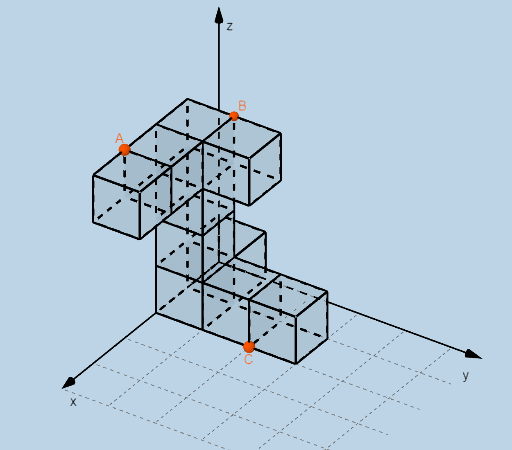
This example demonstrates how to define and manipulate points in a 3D coordinate system. Core mathematical concepts include coordinate representation, point positioning, and vector operations. Using GeoGebra commands and objects like Dilate, Distance, Vector, Textfield, Point, Intersect, and Cube, the transformation and spatial relationships of points can be visually illustrated. Suitable for high school and above students learning solid geometry and vector analysis, helping to understand points, vectors, and geometric solids in three-dimensional space.
GeoGebra Commands & Parameters
Dilate(D, If[0 < d ≤ 1, 1 - d, 0], A_{5}) → D'Dilate(A_{5}, If[1 < d ≤ 2, 2 - d, 0], B_{5}) → A'Dilate(B_{5}, If[2 < d ≤ 3, 3 - d, 0], C_{3}) → B'Distance(D, D') → distanceDD'Distance(A_{5}, A') → distanceAA'Distance(B_{5}, B') → distanceBB'Vector(D, D') → uVector(A_{5}, A') → vVector(B_{5}, B') → wTextfield(a) → InputBox1Textfield(b) → InputBox2Textfield(c) → InputBox3Point(xAxis) → EPoint(Circle[F, Distance[E, F], Segment[E, F]]) → GPoint(yAxis) → HPoint(Circle[H, Distance[D, H], Segment[D, H]]) → IPoint(yAxis) → OPoint(Circle[O, Distance[H, O], Segment[H, O]]) → PPoint(yAxis) → VPoint(Circle[V, Distance[O, V], Segment[O, V]]) → WPoint(yAxis) → E_1Point(Circle[E_1, Distance[V, E_1], Segment[V, E_1]]) → F_1Point(Circle[P, Distance[I, P], Segment[I, P]]) → R_2Intersect(xAxis, yAxis) → JPoint(xAxis) → KPoint(Circle[K, Distance[J, K], Segment[J, K]]) → LCube(J, K, L) → h, M, FlächeLMSR, FlächeNQRS, KanteJM, KanteJK, KanteKL, KanteLM_{1}, KanteJN, KanteMS, KanteNS, KanteNQ_{1}, N, KanteKQ, KanteQR, KanteLR, KanteRS, Q, R, S, FlächeJKLM, FlächeJMSN, FlächeJKQN, FlächeKLRQPoint(xAxis) → TPoint(Circle[T, Distance[K, T], Segment[K, T]]) → UCube(K, T, U) → i, Z, Fläche4, Fläche5, KanteKZ, KanteKT, KanteTU, KanteUZ, Kante1, Kante4, Kante6, Kante5, A_1, Kante2, Kante7, Kante3, Kante8, B_1, C_1, D_1, FlächeKTUZ, Fläche2, Fläche1, Fläche3Point(xAxis) → G_1Point(Circle[G_1, Distance[T, G_1], Segment[T, G_1]]) → H_1Cube(T, G_1, H_1) → j, I_1, Fläche10, Fläche11, Kante10, Kante9, Kante12, Kante14, Kante11, Kante16, Kante18, Kante17, J_1, Kante13, Kante19, Kante15, Kante20, K_1, L_1, M_1, Fläche6, Fläche8, Fläche7, Fläche9Point(xAxis) → N_1Point(Circle[N_1, Distance[G_1, N_1], Segment[G_1, N_1]]) → O_1Point(Circle[Q, Distance[N, Q], Segment[N, Q]]) → U_1Point(Circle[J_1, Distance[A_1, J_1], Segment[A_1, J_1]]) → C_2Cube(A_1, J_1, C_2) → m, D_2, Fläche28, Fläche29, Kante45, Kante44, Kante47, Kante49, Kante46, Kante51, Kante53, Kante52, E_2, Kante48, Kante54, Kante50, Kante55, F_2, G_2, H_2, Fläche24, Fläche26, Fläche25, Fläche27Point(Circle[L, Distance[M, L], Segment[M, L]]) → V_2Point(Circle[U, Distance[L, U], Segment[L, U]]) → D_3Point(Circle[D_3, Distance[V_2, D_3], Segment[V_2, D_3]]) → P_3Intersect(Kante53, Kante46) → P_1Point(Kante52) → Q_1Point(Circle[Q_1, Distance[P_1, Q_1], Segment[P_1, Q_1]]) → R_1Cube(P_1, Q_1, R_1) → k, S_1, Fläche16, Fläche17, Kante22, Kante21, Kante24, Kante26, Kante23, Kante28, Kante30, Kante29, T_1, Kante25, Kante31, Kante27, Kante32, V_1, W_1, Z_1, Fläche12, Fläche14, Fläche13, Fläche15Point(Circle[V_1, Distance[T_1, V_1], Segment[T_1, V_1]]) → A_2Cube(T_1, V_1, A_2) → l, B_2, Fläche22, Fläche23, Kante34, Kante33, Kante36, Kante38, Kante35, Kante40, Kante42, Kante41, I_2, Kante37, Kante43, Kante39, Kante56, J_2, K_2, L_2, Fläche18, Fläche20, Fläche19, Fläche21Point(Circle[A_2, Distance[K_2, A_2], Segment[K_2, A_2]]) → M_2Cube(K_2, A_2, M_2) → n, N_2, Fläche34, Fläche35, Kante60, Kante57, Kante58, Kante62, Kante61, Kante64, Kante66, Kante65, O_2, Kante59, Kante67, Kante63, Kante68, P_2, Q_2, S_2, Fläche30, Fläche33, Fläche31, Fläche32Point(Circle[M_2, Distance[N_2, M_2], Segment[N_2, M_2]]) → T_2Cube(N_2, M_2, T_2) → o, U_2, Fläche40, Fläche41, Kante72, Kante69, Kante70, Kante74, Kante73, Kante76, Kante78, Kante77, W_2, Kante71, Kante79, Kante75, Kante80, Z_2, A_3, B_3, Fläche36, Fläche39, Fläche37, Fläche38Point(Kante73) → AIntersect(Kante72, Kante69) → E_3Point(Circle[E_3, Distance[A, E_3], Segment[A, E_3]]) → F_3Intersect(Kante3, KanteUZ) → L_3Point(Circle[C, Distance[L_3, C], Segment[L_3, C]]) → N_3Cube(L_3, C, N_3) → q, O_3, face11, face12, edge14, edge13, edge16, edge18, edge15, edge20, edge22, edge21, Q_3, edge17, edge23, edge19, edge24, R_3, S_3, T_3, face7, face9, face8, face10Point(Kante38) → U_3Intersect(Kante56, Kante40) → BPoint(Circle[B, Distance[U_3, B], Segment[U_3, B]]) → W_3Cube(U_3, B, W_3) → r, Z_3, face17, face18, edge26, edge25, edge28, edge30, edge27, edge32, edge34, edge33, A_4, edge29, edge35, edge31, edge36, B_4, C_4, D_4, face13, face15, face14, face16Intersect(edge17, edge16) → G_3Point(Circle[H_3, Distance[G_3, H_3], Segment[G_3, H_3]]) → I_3Cube(G_3, H_3, I_3) → p, J_3, face5, face6, edge2, edge1, edge4, edge6, edge3, edge8, edge10, edge9, K_3, edge5, edge11, edge7, edge12, E_4, F_4, G_4, face1, face3, face2, face4
AI Drawing Prompt Reference
In a 3D coordinate system, start with a reference line and two coordinate-axis directions, using their intersection as the main space anchor. In the planes defined by the axes, construct circles centered at the current anchor with radii determined by measured distances, then obtain new 3D points as intersections between each circle and the corresponding line/segment. Use successive triples of these points to build a chain of cubes: first form one cube from three points, then create an adjacent cube using the next set of circle-generated points. Continue by taking intersection points from cube edges and placing additional points on circles tied to those intersections, extending the cube sequence while keeping the same underlying coordinate reference. Add input boxes for three numeric parameters controlling distances and include direction vectors derived from the corresponding transformed point triples.
The prompt above was compiled from the original drawing commands and is for reference only.