
Point-Slope Form Quick Intro
Loading the math board and drawing, please wait…
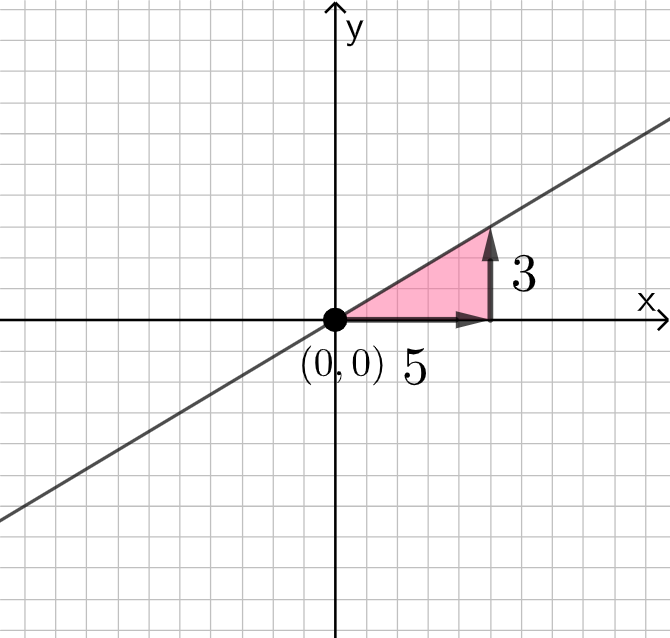
This example demonstrates the point-slope form equation in Cartesian coordinate system, involving core concepts like point-slope form, coordinates, slope, linear equations, and linear functions. It constructs visualizations using commands like Simplify, Vector objects, Polygon objects, and Textfield objects for annotations, making it suitable for middle school and above students learning about linear equations or for educational purposes.
GeoGebra Commands & Parameters
Simplify(y - yc) → fSimplify(x - xc) → gVector(A, B) → uVector(B, C) → vPolygon(A, B, C) → t1, c, a, bTextfield(rise) → InputBox1Textfield(run) → InputBox2
AI Drawing Prompt Reference
Create a Cartesian coordinate visualization for the point-slope form idea. Start by indicating the difference expressions related to y−yc and x−xc to highlight the slope as rise over run. Place three points and connect them to form a triangle that represents the geometric relationship. Draw two vectors originating from the middle point toward the other two points to show the direction of the rise and the run. Add two text input fields on the figure labeled for “rise” and “run” so they can be used to annotate the upward and horizontal changes in the linear equation.
The prompt above was compiled from the original drawing commands and is for reference only.