
Point-Slope Form: Graphing Lines
Loading the math board and drawing, please wait…
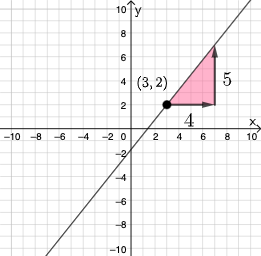
This example demonstrates how to graph linear equations using the point-slope form. It involves core math concepts like point-slope equations, slope, and coordinate geometry. GeoGebra commands and objects used include Simplify, Vector, Polygon, Textfield, Random, RandomElement, FractionText, and If for constructing the graph. Suitable for high school students and teachers learning about linear equations and their graphical representations.
GeoGebra Commands & Parameters
Simplify(y - yc) → fSimplify(x - xc) → gVector(A, B) → uVector(B, C) → vPolygon(A, B, C) → t1, c, a, bTextfield(rise) → InputBox1Textfield(run) → InputBox2Random(-9, 9) → numRandomElement(Union[Sequence[i, i, -9, -1, 1], Sequence[i, i, 1, 9, 1]]) → denomFractionText(num / denom) → text4Random(-9, 9) → yccRandom(-9, 9) → xccSimplify(y - ycc) → hSimplify(x - xcc) → pIf(Slope[eq1] ≟ Slope[eq2], "Your slope is correct.", "Your slope is not correct.") → text3If(A ≟ D, "Your point lies on this line.", "Your point does not lie on this line.") → text7
AI Drawing Prompt Reference
On a coordinate plane, create a graph illustrating a line using the point-slope form. Choose a reference point by selecting its x- and y-coordinates, then build the line direction using vectors derived from that point. Construct the visual using a polygonal shape that connects three key points to convey the relationship between the point and the slope. Add two text input fields labeled for “rise” and “run,” and display the current slope as a fraction. Include on-graph feedback messages indicating whether the entered slope is correct and whether the chosen reference point lies on the line.
The prompt above was compiled from the original drawing commands and is for reference only.