
Plot Integers on Number Line: Geometric Construction and Sequence Concepts
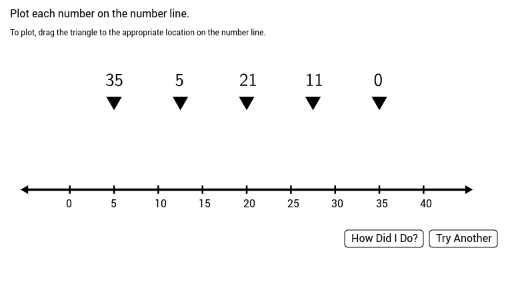
Loading the math board and drawing, please wait…
This example demonstrates how to plot whole numbers on a number line, illustrating the relationship between integers and the number line. Key mathematical concepts include the set of integers, number line representation, and geometric construction techniques. Construction involves using GeoGebra commands like Random, Segment, Sequence, Join, and Point to create integer points and connect them. Suitable for middle school students learning integer concepts and geometric construction, also useful for math teaching demonstrations.
GeoGebra Commands & Parameters
Random(20, 40) → Int5Random(15, Int5 - 5) → Int4Random(10, Int4 - 5) → Int3Random(5, Int3 - 5) → Int2Segment(StartPoint, EndPoint) → MainSegmentSequence((i, 0), i, x(StartPoint) + 5, x(EndPoint) - 5, 5) → TickMarksSequenceRandom(0, Int2 - 5) → Int1Sequence(Text[i, (i - 0.4, -2)], i, 0, 40, 5) → DisplayTickMarksSequenceSequence(Segment[(i / 10, 2.2), (i / 10, 25)], i, -100, 500, 1) → CustomGridSegmentsSequence((i, 1), i, -5, 45, 1) → CustomGridPointsJoin({CustomGridPoints, CustomGridSegments}) → CustomFullGridPoint(CustomFullGrid) → Point1Point(CustomFullGrid) → Point2Point(CustomFullGrid) → Point3Point(CustomFullGrid) → Point4Point(CustomFullGrid) → Point5If(Int1 < 10, LaTeX[Text["\," + Int1]], LaTeX[Text[Int1]]) → IntDisplay1If(Int2 < 10, LaTeX[Text["\," + Int2]], LaTeX[Text[Int2]]) → IntDisplay2If(Int3 < 10, LaTeX[Text["\," + Int3]], LaTeX[Text[Int3]]) → IntDisplay3If(Int4 < 10, LaTeX[Text["\," + Int4]], LaTeX[Text[Int4]]) → IntDisplay4If(Int5 < 10, LaTeX[Text["\," + Int5]], LaTeX[Text[Int5]]) → IntDisplay5Polygon(A1, B1, C1) → Triangle1, c1, a1, b1Polygon(A2, B2, C2) → Triangle2, c2, a2, b2Polygon(A3, B3, C3) → Triangle3, c3, a3, b3Polygon(A4, B4, C4) → Triangle4, c4, a4, b4Polygon(A5, B5, C5) → Triangle5, c5, a5, b5Shuffle(PointsList) → PointsListShuffledLaTeX(Text["\checkmark"]) → RightCheckLaTeX(Text["×"]) → WrongCheckText("Plot each number on the number line. ") → InstGenText("To plot, drag the triangle to the appropriate location on the number line. ") → text1
AI Drawing Prompt Reference
Draw a number line with integer points. Connect the integer points with line segments. Add markers to show the order and position of integers. Start by drawing the number line, then add integer points, connect them, and finally add markers to indicate the order and location of integers.
The prompt above was compiled from the original drawing commands and is for reference only.