
Play Chomp! – An Interactive Strategy Game with Geometric Construction
Loading the math board and drawing, please wait…
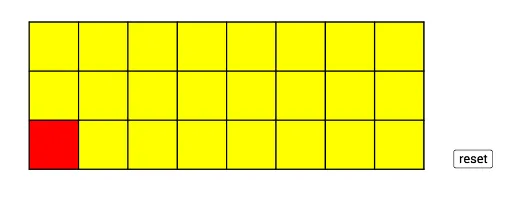
① This example demonstrates the classic strategy game 'Chomp', where players click cells to remove upper-right regions, aiming to force the opponent to take the poisoned square. ② Core mathematical concepts include game theory winning strategies, set theory subset relations, and geometric transformations involving symmetry and position; it also incorporates equilateral triangles, circles, and ratios to construct the board and interactive elements. ③ Construction highlights: GeoGebra commands such as Random for random initial setups, Intersect and Point for key locations, Polygon for board regions, and Sequence for batch-generating cell objects; objects include l, t, A, B, p11–p15, with auxiliary objects f, g, h, etc., enabling dynamic interaction. ④ Suitable for middle school and above, this example serves math game teaching, introductory game theory, geometric and logical thinking training, and as an exploratory case combining programming with mathematics.
GeoGebra Commands & Parameters
Random(5, 10) → lRandom(3, 5) → tIntersect(xAxis, yAxis) → APolygon(A, B, 4) → p11, f, g, h, i, C, DPoint(xAxis) → EPolygon(B, E, 4) → p12, j, k, m, n, F, GPoint(xAxis) → HPolygon(E, H, 4) → p13, p, q, r, s, I, JPoint(xAxis) → KPolygon(H, K, 4) → p14, a, b, c, d, L, MPoint(xAxis) → NPolygon(K, N, 4) → p15, e, f_1, g_1, h_1, O, PPoint(xAxis) → QPolygon(N, Q, 4) → p16, i_1, j_1, k_1, l_1, R, SPoint(xAxis) → TPolygon(Q, T, 4) → p17, m_1, n_1, p_1, q_1, U, VPolygon(T, W, 4) → p18, r_1, s_1, t_1, a_1, Z, A_1Polygon(D, C, 4) → p21, b_1, c_1, d_1, e_1, B_1, C_1Polygon(C, F, 4) → p22, f_2, g_2, h_2, i_2, D_1, E_1Polygon(F, I, 4) → p23, j_2, k_2, l_2, m_2, F_1, G_1Polygon(I, L, 4) → p24, n_2, p_2, q_2, r_2, H_1, I_1Polygon(L, O, 4) → p25, s_2, t_2, a_2, b_2, J_1, K_1Polygon(O, R, 4) → p26, c_2, d_2, e_2, f_3, L_1, M_1Polygon(R, U, 4) → p27, g_3, h_3, i_3, j_3, N_1, O_1Polygon(U, Z, 4) → p28, k_3, l_3, m_3, n_3, P_1, Q_1Polygon(C_1, B_1, 4) → p31, p_3, q_3, r_3, s_3, R_1, S_1Polygon(B_1, D_1, 4) → p32, t_3, a_3, b_3, c_3, T_1, U_1Polygon(D_1, F_1, 4) → p33, d_3, e_3, f_4, g_4, V_1, W_1Polygon(F_1, H_1, 4) → p34, h_4, i_4, j_4, k_4, Z_1, A_2Polygon(H_1, J_1, 4) → p35, l_4, m_4, n_4, p_4, B_2, C_2Polygon(J_1, L_1, 4) → p36, q_4, r_4, s_4, t_4, D_2, E_2Polygon(L_1, N_1, 4) → p37, a_4, b_4, c_4, d_4, F_2, G_2Polygon(N_1, P_1, 4) → p38, e_4, f_5, g_5, h_5, H_2, I_2Sequence(Segment[(a, 0), (a, 3)], a, 0, 8) → L_2Sequence(Segment[(0, a), (8, a)], a, 0, 3) → L_3