
Planes and Normals
Loading the math board and drawing, please wait…
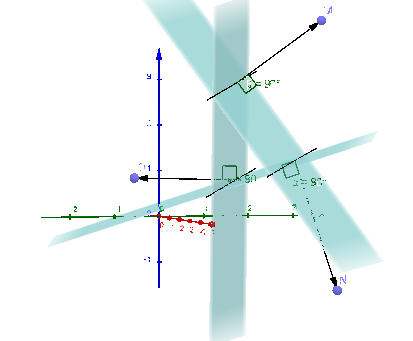
This example demonstrates the geometric relationship and calculation methods of planes and normals. Key math concepts include plane equations, linear functions, coordinate geometry, right triangles, vector operations, and angle calculations. It is constructed using GeoGebra commands like Line, Plane, Point, OrthogonalLine, Vector, and Angle. Suitable for high school and university students learning solid geometry, coordinate geometry, and vector mathematics, as well as basic university mathematics teaching.
GeoGebra Commands & Parameters
Line(A, B) → fLine(C, f) → gLine(D, f) → hPlane(D, B, A) → aPoint(f) → EPoint(f) → FPlane(D, E, F) → bPlane(E, F, C) → cPoint(g) → GPoint(g) → HPoint(h) → IPlane(H, C, D) → dPoint(h) → JPoint(g) → KPoint(f) → LOrthogonalLine(J, b) → iOrthogonalLine(K, c) → jPoint(j) → NVector(K, N) → vAngle(N, K, L) → αOrthogonalLine(L, b) → kPoint(k) → OVector(L, O) → wOrthogonalLine(J, d) → lPoint(l) → MVector(J, M) → uAngle(K, J, M) → βAngle(O, L, J) → γ
AI Drawing Prompt Reference
Draw three planes and their normals to illustrate the geometric relationships between them. Start by creating a line and use it along with two points to form two new planes. Then, mark key points on these planes and draw perpendicular lines as normals. Calculate and display the angles between the normals, and the vectors formed by the intersection points of normals with planes. The final image should include multiple planes, normals, points, and vectors, along with their angle relationships.
The prompt above was compiled from the original drawing commands and is for reference only.